

Coolors
✓ VerifiedCoolors is a fast color palette generator for designers to create, explore, and export beautiful color schemes in seconds.
Best For: Designers, developers, and creatives who need quick color palette generation and management
The Verdict: Coolors
Coolors is the best color palette tool available for speed and accessibility in 2026. The spacebar generation mechanic turns color selection from a deliberate high-stakes design decision into rapid creative exploration, and the image color extraction feature removes the friction of manually identifying colors from reference photos. For UI designers, brand designers, and developers who regularly need color palettes, the free plan covers most daily needs without any payment.
The free tier's 10-palette save limit becomes restrictive for active professionals managing multiple projects or clients. Coolors Pro at a few dollars per month removes that friction and adds AI generation for text-prompted palette creation. The one limitation worth noting is that Coolors does not provide an API, so teams that want to integrate palette generation into their tools or workflows need to use the web interface or export formats manually. For design teams that live in Figma, the plugin integration handles most use cases without needing the full web platform.
What is Coolors?
Coolors is a color palette generator and design tool that helps designers, developers, and creatives build, explore, and export professional color schemes. The core mechanic is a spacebar-driven generator that produces new palette combinations instantly, allowing rapid exploration without deliberate color theory decisions. The platform serves designers at companies including Netflix, Disney, and Microsoft, and hosts over 10 million community-created color schemes that users can browse by mood, style, or category.
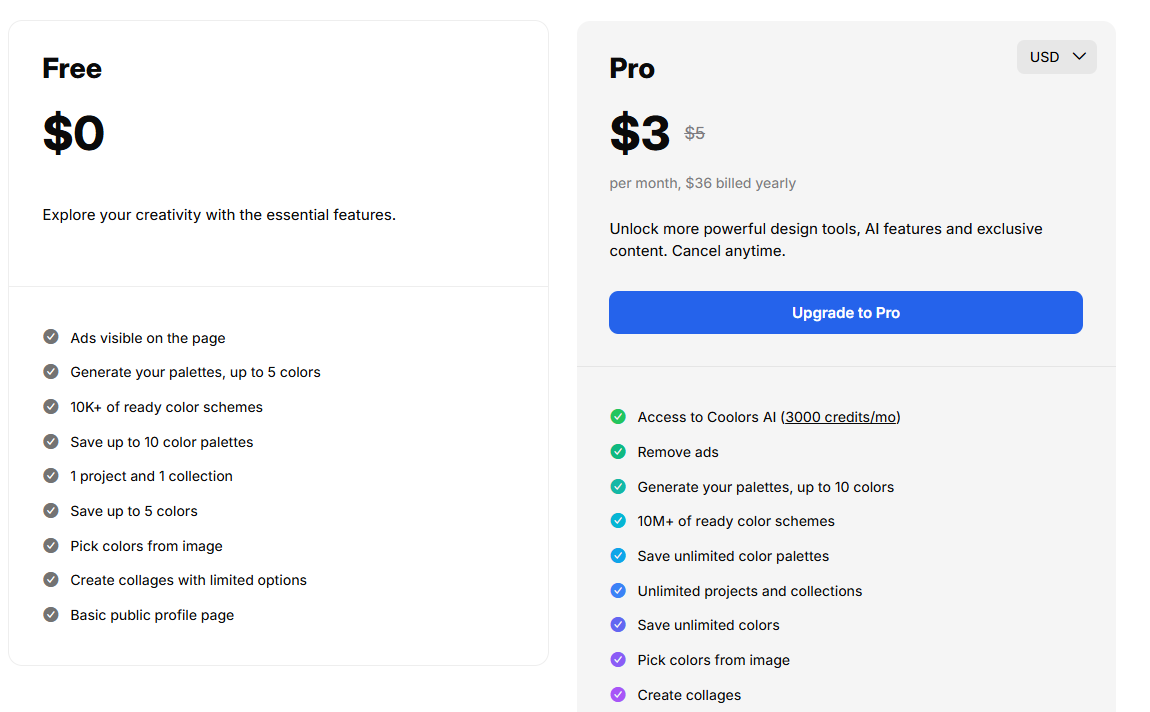
The tool set includes a palette generator, image color picker for extracting palettes from photos, a contrast checker for WCAG accessibility compliance, an AI palette generator on paid plans, a collage maker, and a Figma plugin. Export options cover HEX, RGB, HSB, CMYK, LAB, RAL, and professional library formats. The free plan allows saving up to 10 palettes and provides access to the palette generator and community schemes. Coolors Pro removes ads, unlocks unlimited palette saves, adds AI generation, private profiles, customizable logos on PDF exports, and advanced export options.
Who is Coolors Best For?
Designers, developers, and creatives who need quick color palette generation and management
Coolors Key Features
Coolors Pricing & Plans
Coolors Review Summary
| Performance Score | A |
| Content Quality | Color generation is fast and accurate with solid color theory applied automatically |
| Interface | Minimal and intuitive with the spacebar interaction making it instantly usable |
| AI Technology | AI-powered suggestions help generate harmonious palettes based on color input |
| Purpose | Color palette creation and management for designers and creative professionals |
| Compatibility | Web, Mobile, Extension |
| Pricing Summary | Free plan available with core features, Pro plan at around $4.99 per month removes ads and adds advanced exports |
Coolors Pros & Cons
✅ Pros
- Free plan is genuinely useful with no time limits
- Works on web, mobile apps, and as a browser extension
- Figma integration fits directly into design workflows
- Pro plan is affordable at around $5 per month
❌ Cons
- Advanced export options locked behind Pro plan
- Free plan limits saved palettes to 10
- Ads shown on free tier can interrupt the workflow
- No API access for developers
FAQs
What is Coolors used for?
▼Is Coolors free to use?
▼What platforms does Coolors support?
▼Who is Coolors best for?
▼Does Coolors offer a free trial?
▼More AI Tools You Might Like

Sendible is an agency focused social media management platform built for client…
View Tool ↗
SocialBee is an AI social media management tool that focuses heavily on…
View Tool ↗
Metricool is an analytics focused social media management tool that tracks competitors…
View Tool ↗
Later is a visual social media scheduler built for Instagram creators influencers…
View Tool ↗
Agorapulse is a social media management platform focused on unified inbox management…
View Tool ↗
SocialPilot is a social media management platform for scheduling posts collaborating with…
View Tool ↗
ContentStudio is an AI social media management platform for content creation scheduling…
View Tool ↗
Publer is a social media management platform for scheduling posts creating content…
View Tool ↗