

Meshy AI
✓ VerifiedMeshy AI converts text prompts and images into textured 3D models in under a minute, no 3D modeling experience required.
Best For: Game developers, indie creators, and 3D printing enthusiasts who need fast 3D asset generation
The Verdict: Meshy AI
Meshy is the best AI 3D tool for game developers and creators who need fast concept assets, product visualizations, and 3D printing models without traditional modeling workflows. The image-to-3D feature compresses hours of asset blocking into seconds, and the plugin integrations mean generated models flow directly into the tools developers already use. At $20 per month for Pro, the value is strong for creators who generate assets regularly.
The honest limitation is topology quality. Meshy produces fast first-draft assets, not production-clean geometry. Most generated models need manual retopology before rigging or shipping in a game, which adds post-production time that experienced 3D artists factor into their expectations. The free plan's CC BY 4.0 license also restricts commercial use for anyone who cannot attribute the output. For concept validation, rapid prototyping, and 3D printing, Meshy is excellent. For final-production game assets or film-quality models, traditional modeling tools remain necessary for cleanup and refinement.
What is Meshy AI?
Meshy is an AI-powered 3D model generation platform that turns text prompts and reference images into textured, riggable 3D assets in seconds. It is built for game developers, concept artists, AR and VR creators, and 3D printing enthusiasts who need fast first-draft assets without deep expertise in traditional 3D modeling software like Blender or Maya. The current version is Meshy v6, released January 18, 2026, which added refined geometry for characters and organic models, Low Poly Mode for game developers, multi-color 3D printing support, and expanded API features.
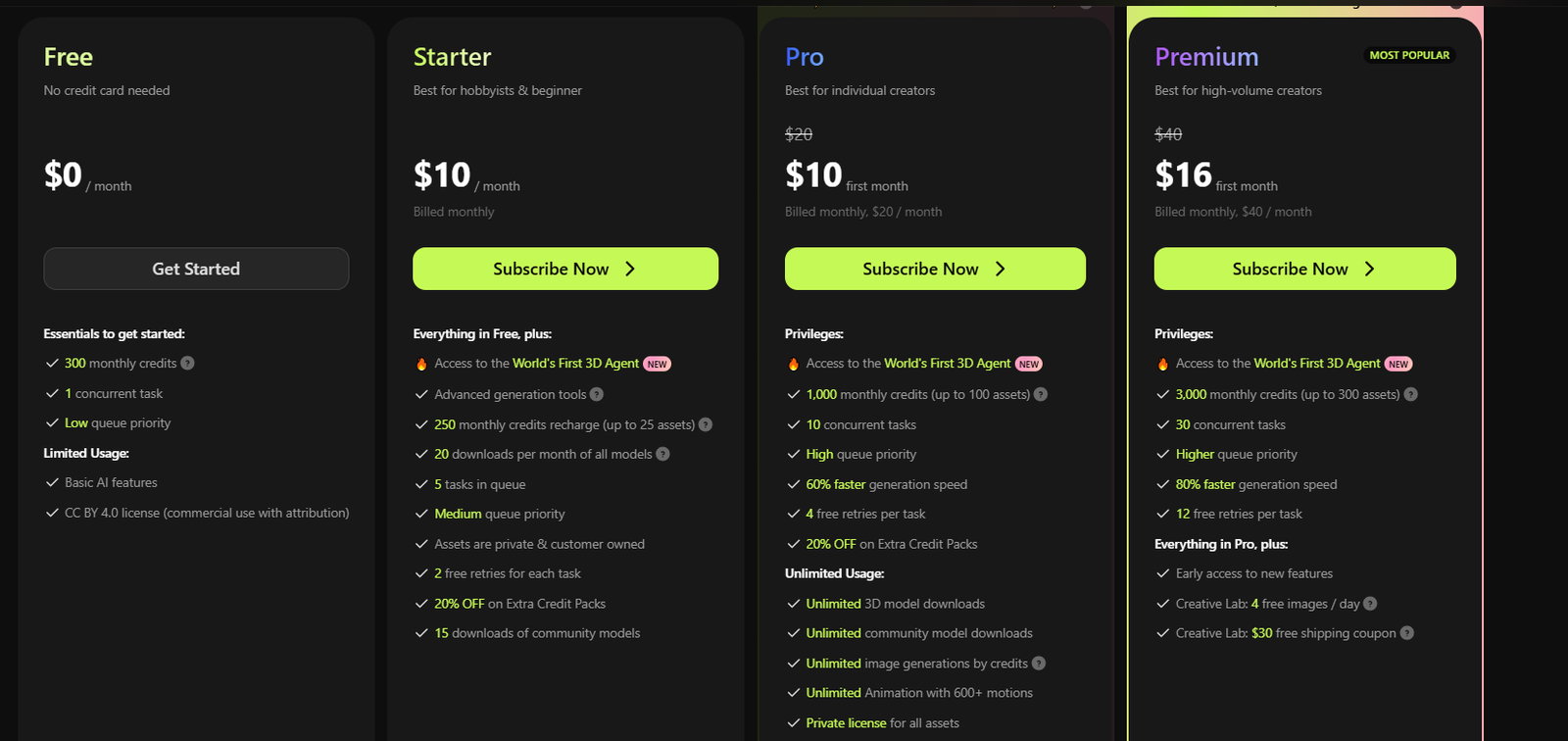
The platform generates models that export in FBX, GLB, OBJ, STL, 3MF, USDZ, and BLEND formats, and includes direct plugins for Blender, Unity, Unreal Engine, Godot, and Roblox Studio. AI texturing supports realistic, cartoon, and hand-painted style outputs. Character rigging and animation workflows are included, with an animation library for applying standard motions to generated characters. The free plan provides 100 credits per month with outputs under a CC BY 4.0 license that requires attribution for commercial use. The Pro plan costs $20 per month for 1,000 credits with private assets and API access. The Studio plan runs $60 per month for 4,000 credits with team features and higher concurrency limits.
Who is Meshy AI Best For?
Game developers, indie creators, and 3D printing enthusiasts who need fast 3D asset generation
Meshy AI Key Features
Meshy AI Pricing & Plans
Meshy AI Review Summary
| Performance Score | A |
| Content Quality | Meshy 6 outputs are clean enough for game engines and 3D printing without significant manual repair |
| Interface | Browser-based editor with built-in 3D viewer that keeps the workflow in one tab |
| AI Technology | Uses in-house diffusion models to generate watertight PBR-textured meshes from text or image input |
| Purpose | Rapid 3D asset generation for games, design, film, and 3D printing workflows |
| Compatibility | Web, API |
| Pricing Summary | Free plan with 100 credits, Pro at $20 per month with 1000 credits and commercial rights, Studio at $60 per month for teams |
Meshy AI Pros & Cons
✅ Pros
- Fastest text-to-3D generation speed in its category
- Free plan lets you test without a credit card
- Supports all major 3D formats and game engine plugins
- 10 million plus users and 100 million plus models generated
❌ Cons
- Free plan restricts downloads of Meshy 6 outputs
- Credit system limits iteration on complex projects
- Auto-rigging struggles with cartoon proportions and complex anatomy
- Character models can still produce extra fingers
FAQs
What is Meshy AI used for?
▼Is Meshy AI free to use?
▼What platforms does Meshy AI support?
▼Who is Meshy AI best for?
▼Does Meshy AI offer a free trial?
▼More AI Tools You Might Like

Sendible is an agency focused social media management platform built for client…
View Tool ↗
SocialBee is an AI social media management tool that focuses heavily on…
View Tool ↗
Metricool is an analytics focused social media management tool that tracks competitors…
View Tool ↗
Later is a visual social media scheduler built for Instagram creators influencers…
View Tool ↗
Agorapulse is a social media management platform focused on unified inbox management…
View Tool ↗
SocialPilot is a social media management platform for scheduling posts collaborating with…
View Tool ↗
ContentStudio is an AI social media management platform for content creation scheduling…
View Tool ↗
Publer is a social media management platform for scheduling posts creating content…
View Tool ↗