

Synthesia
✓ VerifiedSynthesia turns written scripts into professional AI avatar videos in minutes, with 180 plus avatars and support for 140 plus languages.
Best For: L&D teams, marketers, and trainers who need to produce professional videos without cameras or studios
The Verdict: Synthesia
Synthesia is the best AI video tool for enterprise learning and development teams that produce training, onboarding, and compliance videos at scale. The SCORM export, multilingual support, collaboration controls, and structured editor make it the most complete enterprise video platform available in 2026. For L&D teams replacing traditional video production, Synthesia reduces costs significantly while maintaining the professional presentation quality that corporate training requires.
For individual creators and small teams, Synthesia's pricing structure and enterprise-oriented workflow are harder to justify compared to HeyGen's more flexible Creator plan. The avatar naturalness is also a step behind HeyGen's Avatar IV engine for close-up, emotionally nuanced content. Choose Synthesia for predictable enterprise deployment. Choose HeyGen for creator flexibility and avatar realism.
What is Synthesia?
Synthesia is an AI video generation platform built for enterprise teams that need to produce structured, presenter-led videos at scale. It provides over 240 AI avatars across 160 plus languages, a browser-based editor, SCORM export for learning management systems, and collaboration features designed for teams creating training, onboarding, and internal communication content. The platform is used by over 50,000 companies globally, including enterprise clients in regulated industries.
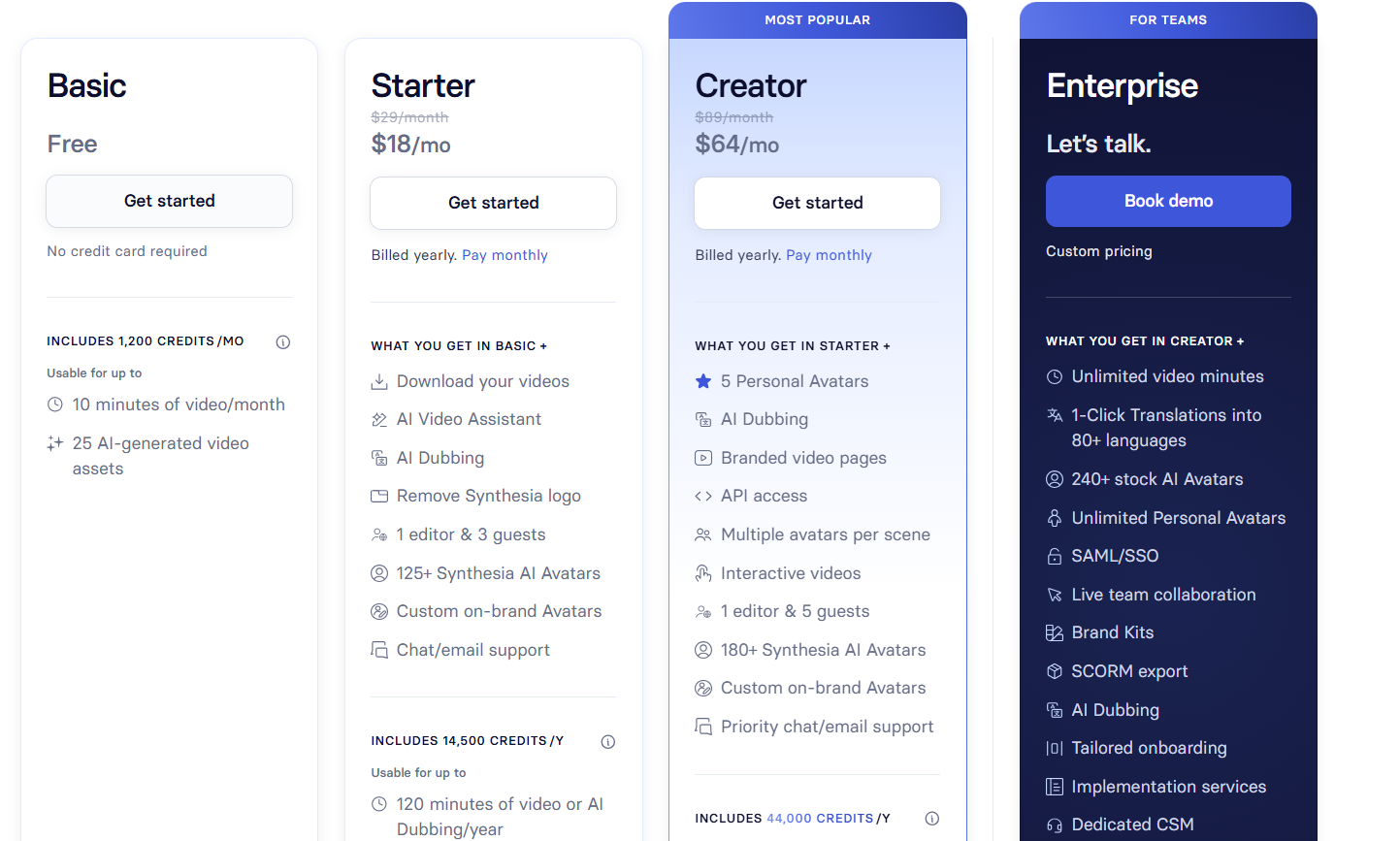
Synthesia's 2026 releases added emotional avatars that adapt facial expressions based on script context, one-click translation with automatic audio dubbing, and an expanded voice cloning feature. The platform does not publish consumer-facing monthly pricing in the traditional sense. Individual plans start at approximately $22 to $29 per month on annual billing for solo use. Business and Enterprise plans are custom-quoted and typically run between $7,500 and $25,000 per year depending on seat count, video volume, and compliance requirements. SCORM export, SSO, and HIPAA compliance are enterprise-tier features.
Synthesia wins specifically on structured enterprise workflow. The editor is designed around a slide-based composition format that is familiar to anyone who has built presentations, making adoption faster for non-technical corporate teams compared to timeline-based video editors.
Who is Synthesia Best For?
L&D teams, marketers, and trainers who need to produce professional videos without cameras or studios
Synthesia Key Features
Synthesia Pricing & Plans
Synthesia Review Summary
| Performance Score | A |
| Content Quality | Avatar lip-sync and script delivery quality are among the most natural in the AI video category |
| Interface | Intuitive script editor with template library that makes video creation accessible for non-technical users |
| AI Technology | Uses advanced generative AI for realistic avatar rendering, voice synthesis, and multilingual dubbing |
| Purpose | AI avatar video generation for corporate training, marketing, and global content localization |
| Compatibility | Web, API |
| Pricing Summary | Free plan with 10 minutes per month, Starter at $29 per month, Creator at $89 per month, Enterprise custom pricing |
Synthesia Pros & Cons
✅ Pros
- Produces convincing presenter videos without any filming or editing skills
- 140 plus language support makes global content creation practical
- Strong reviews with 4.7 rating on G2 from over 2000 verified users
- Free plan available with 10 minutes per month for testing
❌ Cons
- Video minute limits are tight on Starter and Creator plans
- SCORM export and 1-click translation locked to Enterprise plan only
- Monthly minute caps can be exhausted quickly for high-volume teams
- Enterprise pricing is custom and typically runs into four figures annually
FAQs
What is Synthesia used for?
▼Is Synthesia free to use?
▼What platforms does Synthesia support?
▼Who is Synthesia best for?
▼Does Synthesia offer a free trial?
▼More AI Tools You Might Like

Sendible is an agency focused social media management platform built for client…
View Tool ↗
SocialBee is an AI social media management tool that focuses heavily on…
View Tool ↗
Metricool is an analytics focused social media management tool that tracks competitors…
View Tool ↗
Later is a visual social media scheduler built for Instagram creators influencers…
View Tool ↗
Agorapulse is a social media management platform focused on unified inbox management…
View Tool ↗
SocialPilot is a social media management platform for scheduling posts collaborating with…
View Tool ↗
ContentStudio is an AI social media management platform for content creation scheduling…
View Tool ↗
Publer is a social media management platform for scheduling posts creating content…
View Tool ↗