

TradingView
✓ VerifiedCharting platform with advanced charts, Pine Script strategies, screeners, and a social community covering stocks, crypto, forex, and futures.
Best For: Traders who want the best charts, custom indicators, and community trade ideas
The Verdict: TradingView
TradingView is the charting platform most traders should start with, and for many it is the only one they will ever need. The charts, scripting, and community ideas are a class above what brokers bundle for free, and the free plan is strong enough that plenty of users never pay a cent. The weaknesses are cost creep at the top tiers and the separate exchange data fees that surprise newcomers. If charts drive your decisions, this is the benchmark everything else gets measured against.
What is TradingView?
TradingView is a browser-first charting platform that tracks stocks, crypto, forex, futures, indices, and bonds in one workspace. Its Supercharts are the draw: multi-chart layouts, hundreds of indicators and drawing tools, and data from exchanges around the world, all running in a tab instead of heavy desktop software. Watchlists, layouts, and alerts follow your account across web, desktop, and mobile.
What sets it apart is the layer on top of the charts. Pine Script lets anyone code custom indicators and strategies and test them against history with the built-in strategy tester. Screeners slice every major market by technical and fundamental filters, and the ideas feed turns the platform into a social network where traders publish annotated charts you can learn from or challenge. Supported brokers connect directly, so analysis and order placement happen on the same screen.
The platform fits almost every level. A casual investor can live happily on the free plan with paper trading for practice, while active traders pay for extra chart layouts, more indicators, and the real-time exchange data packages their markets require. The honest catch is that the charting is only the starting cost: serious users stack a plan plus data feeds, and the bill reflects that.
Who is TradingView Best For?
Traders who want the best charts, custom indicators, and community trade ideas
TradingView Key Features
TradingView Pricing & Plans
TradingView Review Summary
| Performance Score | A |
| Content Quality | The built-in news, calendars, and community ideas turn a charting tool into a full market research desk. |
| Interface | Supercharts are fast and clean, and layouts sync across web, desktop, and mobile without fuss. |
| AI Technology | An optional AI Copilot add-on explains chart patterns, while Pine Script powers the strategy and indicator engine. |
| Purpose | TradingView exists to give traders of every market one place to chart, screen, backtest, and share trade ideas. |
| Compatibility | Web, Mobile, Desktop, Extension |
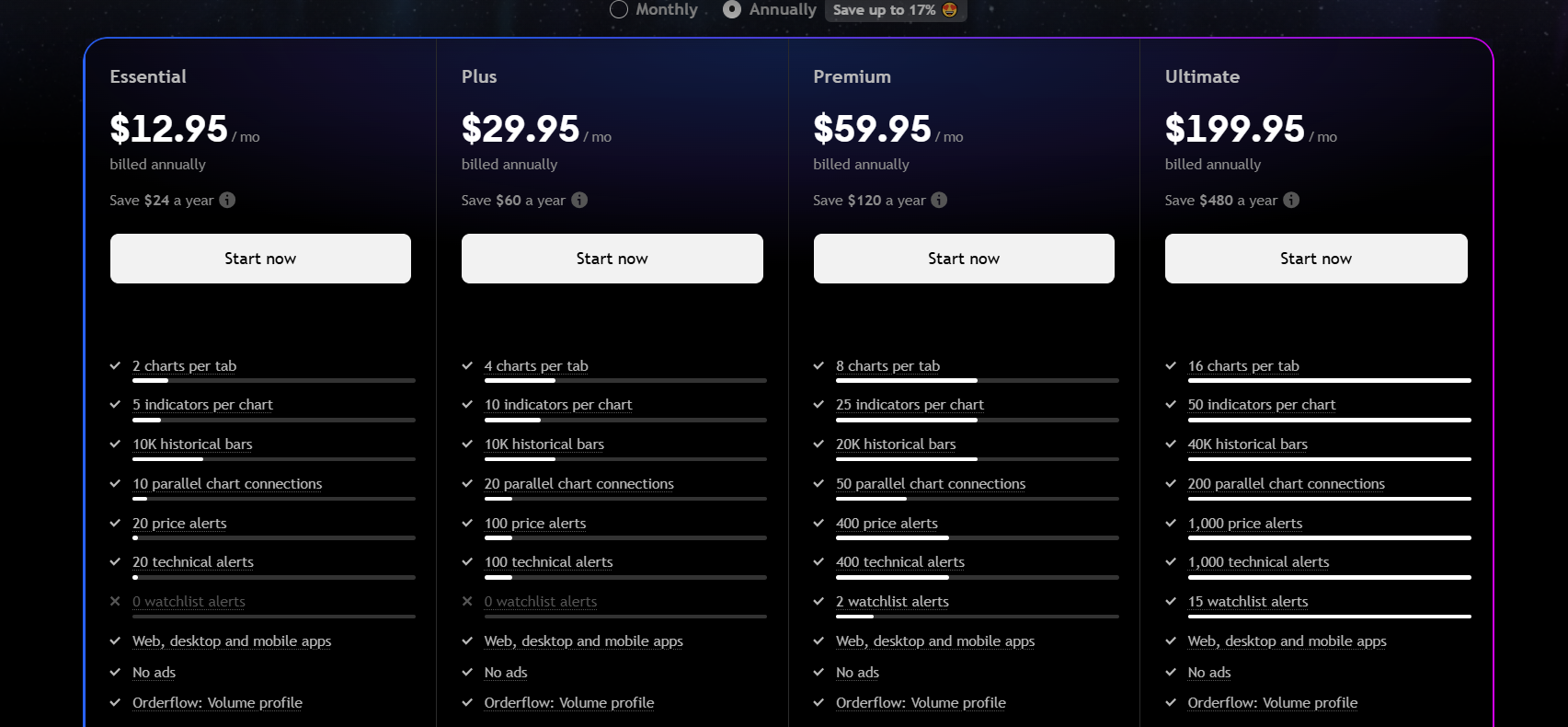
| Pricing Summary | TradingView is free on the Basic plan, and paid plans run from $14.95/month up to $239.95/month, with real-time exchange data sold separately. |
TradingView Pros & Cons
✅ Pros
- Best in class charting that most rival platforms struggle to match
- Huge community library of free indicators and strategy scripts
- Free plan is generous enough for casual chart watchers
- Works on every device with layouts synced to your account
- Broker integrations let you trade without leaving the chart
- New features and data feeds arrive constantly
❌ Cons
- Real-time exchange data costs extra on top of any plan
- Higher tiers get pricey for traders who need many charts at once
- Free plan shows ads and limits the indicators you can load per chart
- Customer support is thin for a platform of this size
- Pine Script has a learning curve for non-coders
FAQs
Is TradingView free to use?
▼What is Pine Script?
▼Can I trade directly from TradingView?
▼Does TradingView offer real-time data?
▼Is TradingView good for beginners?
▼Can TradingView send me price alerts?
▼More AI Tools You Might Like

Automated diagram software with intelligent formatting and data driven org charts across…
View Tool ↗
Figma's whiteboard with AI generation for diagrams, flowcharts and workshop boards from…
View Tool ↗
Diagram as code platform with an AI editor that writes and fixes…
View Tool ↗
Desktop and online diagram software with AI generation, 210+ diagram types and…
View Tool ↗
Budget friendly AI diagram tool with 100+ diagram types and a flat…
View Tool ↗
Professional diagramming software with AI generation, deep shape libraries and strong team…
View Tool ↗
Fast AI flowchart and mind map generator that turns text prompts into…
View Tool ↗
Team whiteboard with AI diagram generation, turning prompts into flowcharts and diagrams…
View Tool ↗