

Composer
✓ VerifiedNo code platform for building, backtesting, and automating trading strategies called symphonies, with AI assisted creation.
Best For: Non coders who want systematic, rules based investing without spreadsheets
The Verdict: Composer
Composer is the friendliest route into systematic trading for people who will never write Python. The editor, the honest backtest cost modeling, and the copyable community strategies make it a learning tool as much as a trading one. Respect the backtest trap, paper thin strategies break in live markets, and remember that a subscription buys automation, not returns. For rules based investors in the US, it is an easy recommendation.
What is Composer?
Composer, now part of SoFi, turns systematic trading into a drag and drop exercise. Strategies are called symphonies, and you build them in a visual editor from plain blocks: choose a pool of stocks or ETFs, add if this then that conditions based on price, moving averages, or momentum, filter and rank the candidates, and set how the winners get weighted. No code, no spreadsheet gymnastics. An AI assistant can draft a first version from a sentence describing what you want, and every block stays editable afterward.
The workflow is build, backtest, then automate. The backtester runs your symphony against years of history, compares it with benchmarks, and models the fees and slippage most platforms quietly leave out. When a strategy earns your trust, Composer executes and rebalances it for you, with trades placed once a day near the close through its brokerage and clearing partners. A large community gallery means you rarely start from zero: copy a published symphony, open it up, change the logic, and make it yours.
Composer fits investors who think in rules but do not program: the spreadsheet tinkerers, the momentum followers, the people who always wanted to test whether a simple rotation strategy actually beats buy and hold. Retirement accounts are supported, which is still rare in this corner of fintech. Its limits are plain: US residents only, daily rather than intraday execution, and backtests that can make a fragile idea look sturdier than live markets will.
Who is Composer Best For?
Non coders who want systematic, rules based investing without spreadsheets
Composer Key Features
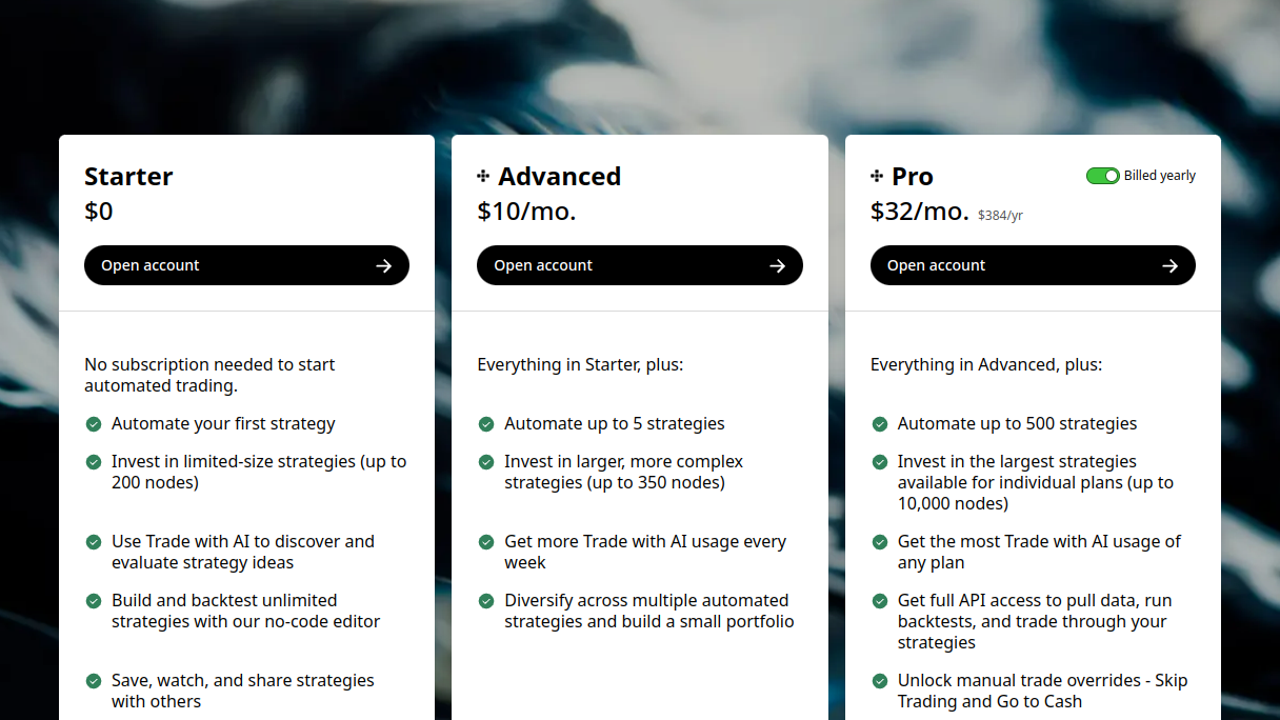
Composer Pricing & Plans
Composer Review Summary
| Performance Score | A |
| Content Quality | The symphony gallery and strategy breakdowns teach systematic investing better than most courses. |
| Interface | The visual editor feels like a flowchart, clean enough that beginners finish their first build in one sitting. |
| AI Technology | An AI assistant drafts strategies from text prompts, and the rules engine automates execution and rebalancing. |
| Purpose | Composer exists to give non coders the systematic, backtested trading tools once limited to quant funds. |
| Compatibility | Web, Mobile |
| Pricing Summary | Composer is free for building and backtesting strategies, and the Trading Pass for live automated trading costs $40/month or $384/year. |
Composer Pros & Cons
✅ Pros
- Quant style strategies without writing a line of code
- Every community strategy is fully editable, nothing is a black box
- Backtests show fees and slippage instead of hiding trading costs
- Retirement account support is rare among automation tools
- The gallery makes learning by example genuinely fun
❌ Cons
- US residents only, which shuts out international investors
- Trades execute once a day near the close, which rules out intraday strategies
- Backtests can flatter a strategy that live markets will punish
- The logic editor still takes time to learn despite the no code pitch
- Smaller asset universe than a full service broker
FAQs
Is Composer free to use?
▼What is a symphony on Composer?
▼Do I need coding skills for Composer?
▼Can I use Composer in an IRA?
▼Who holds my money with Composer?
▼Is Composer available outside the US?
▼More AI Tools You Might Like

Automated diagram software with intelligent formatting and data driven org charts across…
View Tool ↗
Figma's whiteboard with AI generation for diagrams, flowcharts and workshop boards from…
View Tool ↗
Diagram as code platform with an AI editor that writes and fixes…
View Tool ↗
Desktop and online diagram software with AI generation, 210+ diagram types and…
View Tool ↗
Budget friendly AI diagram tool with 100+ diagram types and a flat…
View Tool ↗
Professional diagramming software with AI generation, deep shape libraries and strong team…
View Tool ↗
Fast AI flowchart and mind map generator that turns text prompts into…
View Tool ↗
Team whiteboard with AI diagram generation, turning prompts into flowcharts and diagrams…
View Tool ↗