

EdrawMax
✓ VerifiedDesktop and online diagram software with AI generation, 210+ diagram types and a one time licence.
Best For: Users who want desktop software they can own, across many diagram types
The Verdict: EdrawMax
EdrawMax is the desktop and ownership pick: the widest diagram range in the list, real offline apps, and a perpetual licence in a category of subscriptions. The extra AI add on cost and the lack of a free plan are the honest downsides. For individuals who diagram regularly on their own machine, it offers the best long term value story here.
What is EdrawMax?
EdrawMax is all purpose diagram software for Windows, Mac and Linux, with an online version and mobile apps alongside the desktop programs. It covers more than 210 diagram types, from flowcharts, org charts and mind maps to UML, ER diagrams, network diagrams, floor plans, Gantt charts and electrical diagrams, backed by large symbol libraries.
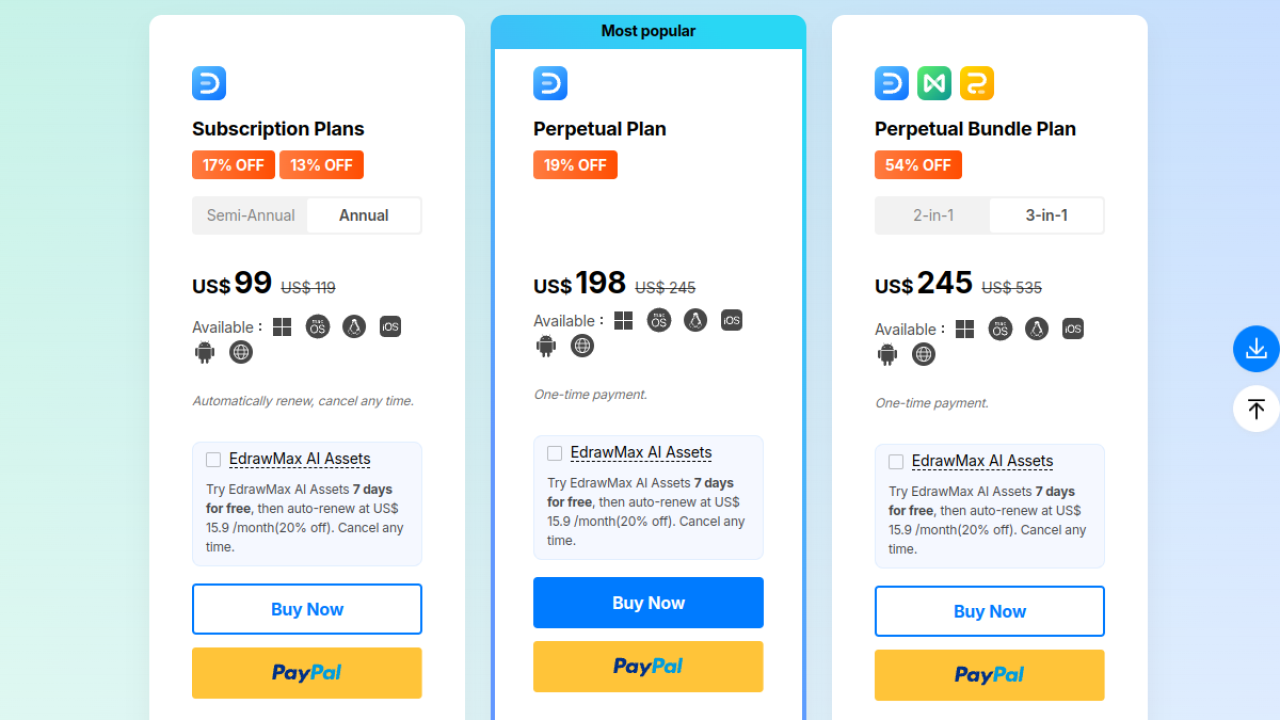
Edraw AI sits inside that desktop workflow. It generates diagrams from a text prompt, including flowcharts, mind maps and timelines, and adds AI drawing assistance and analysis, with AI use running on a token based system. An optional AI Assets add on extends the AI features for a separate monthly cost after a short free period, which buyers should factor into the real price.
Pricing is the other difference. Alongside six month and annual subscriptions, EdrawMax sells a perpetual licence for the desktop version as a one time payment, the only ownership option in this category. There is no permanent free plan, only a trial. Users who prefer installed software, work offline, or dislike subscriptions will find EdrawMax the natural fit here, while browser first teams will likely stay with the web tools.
Who is EdrawMax Best For?
Users who want desktop software they can own, across many diagram types
EdrawMax Key Features
EdrawMax Pricing & Plans
EdrawMax Review Summary
| Performance Score | B |
| Content Quality | Accurate diagrams with deep symbol libraries, strongest on structured technical types. |
| Interface | Feature dense desktop interface that rewards regular users more than beginners. |
| AI Technology | Prompt generation and drawing assistance running on a token based meter. |
| Purpose | All purpose diagramming software for desktop first users. |
| Compatibility | Desktop, Web, Mobile |
| Pricing Summary | EdrawMax starts at $69 for a six month subscription, with annual and one time perpetual licence options above it. |
EdrawMax Pros & Cons
✅ Pros
- The only tool here with a true one time purchase for the desktop app
- Desktop apps for all three major systems, not just a browser tab
- Diagram type range is the widest in this list
- Subscription plans cover several devices per user
- A free trial lets you test the full workflow before paying
❌ Cons
- No permanent free plan, only a trial
- The AI Assets add on is a separate monthly cost that is easy to overlook
- Interface density can overwhelm first time users
- Online and desktop feature parity takes some checking per diagram type
FAQs
Is EdrawMax free to use?
▼How does EdrawMax pricing work?
▼What is the AI Assets add on?
▼What diagrams can EdrawMax create?
▼Does EdrawMax work offline?
▼Can EdrawMax generate a diagram from text?
▼More AI Tools You Might Like

Automated diagram software with intelligent formatting and data driven org charts across…
View Tool ↗
Figma's whiteboard with AI generation for diagrams, flowcharts and workshop boards from…
View Tool ↗
Diagram as code platform with an AI editor that writes and fixes…
View Tool ↗
Budget friendly AI diagram tool with 100+ diagram types and a flat…
View Tool ↗
Professional diagramming software with AI generation, deep shape libraries and strong team…
View Tool ↗
Fast AI flowchart and mind map generator that turns text prompts into…
View Tool ↗
Team whiteboard with AI diagram generation, turning prompts into flowcharts and diagrams…
View Tool ↗
AI diagram tool for technical teams, creating architecture, ER and sequence diagrams…
View Tool ↗