

Mermaid Chart
✓ VerifiedDiagram as code platform with an AI editor that writes and fixes Mermaid diagrams from prompts.
Best For: Developers and technical writers who keep diagrams as code in docs and repos
The Verdict: Mermaid Chart
Mermaid Chart is the developer pick in this category: AI written diagram code that lives in your repos and docs, with an editor that fixes syntax as well as generating it. The yearly credit pool and the code first interface narrow its audience. Teams that document software for a living will find it the most maintainable option here.
What is Mermaid Chart?
Mermaid Chart is the hosted platform for Mermaid, the diagram as code syntax that developers already embed in GitHub readmes, wikis and documentation. Its AI chat writes Mermaid code from a plain language description and, just as usefully, repairs broken or messy code you paste in. The output covers flowcharts, sequence diagrams, class and state diagrams, ER diagrams, Gantt charts, user journeys, git graphs, mind maps and timelines.
Because diagrams are stored as text, they version in Git, diff cleanly in pull requests and never lock a team into a binary file format. A visual editor sits beside the code for layout adjustments, and VS Code and IDE extensions in the wider Mermaid ecosystem keep the same diagrams editable inside the tools developers already use.
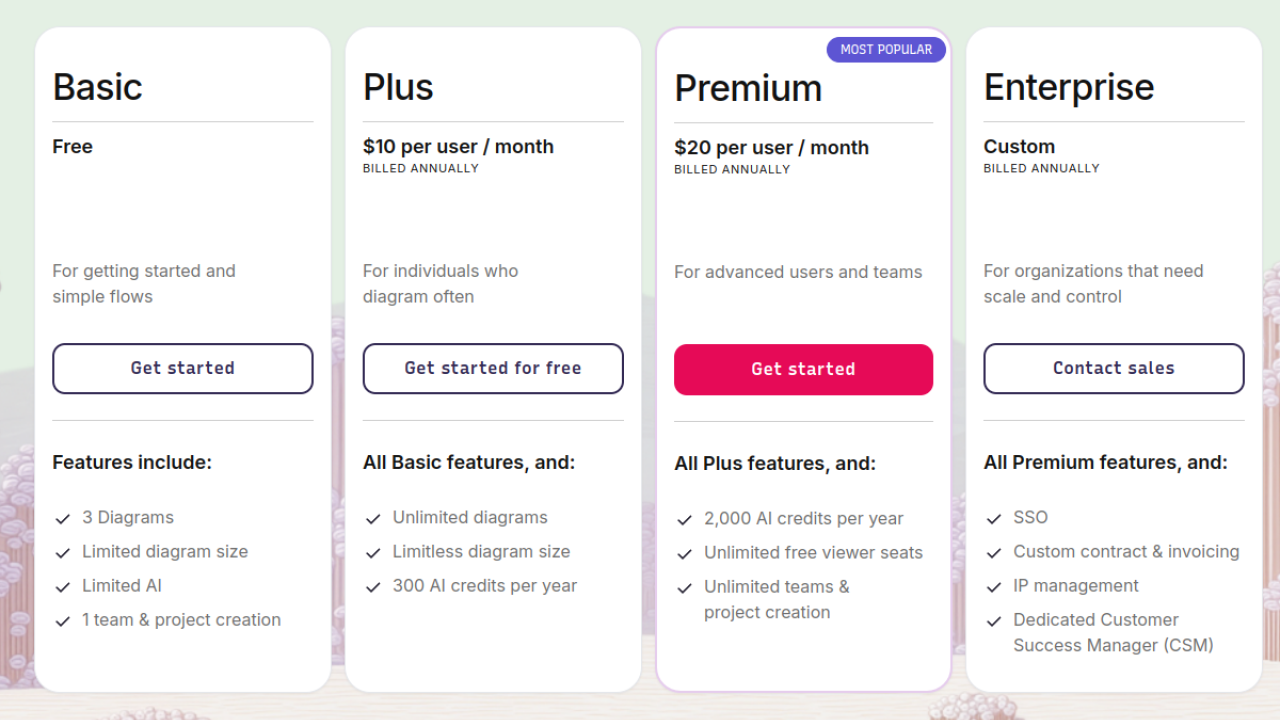
The pricing model needs one warning. Paid plans are billed per user annually, and AI credits come as a yearly pool rather than a monthly allowance, so a heavy documentation sprint can consume a noticeable share early. The free Basic plan limits diagram count and size. For documentation heavy engineering teams, that trade is usually worth it; for canvas first users, it is not the right shape at all.
Who is Mermaid Chart Best For?
Developers and technical writers who keep diagrams as code in docs and repos
Mermaid Chart Key Features
Mermaid Chart Pricing & Plans
Mermaid Chart Review Summary
| Performance Score | B |
| Content Quality | Accurate, syntax correct diagrams that render consistently anywhere Mermaid is supported. |
| Interface | A code first editor with a visual side, best for users comfortable with text. |
| AI Technology | Prompt based code writing and repair, metered by yearly AI credits. |
| Purpose | Creating and maintaining diagrams as code for software documentation. |
| Compatibility | Web, API, Extension |
| Pricing Summary | Mermaid Chart starts at $10/month per user on annual billing after a free Basic plan with limited diagrams. |
Mermaid Chart Pros & Cons
✅ Pros
- Diagrams live as text, so they version, diff and review like code
- The AI editor fixes broken syntax instead of only generating new diagrams
- Every Mermaid diagram type is supported, from ER to git graphs
- Viewer seats are free on Premium, which suits documentation teams
- The free plan is enough to learn the Mermaid workflow properly
❌ Cons
- AI credits are counted per year, so heavy months eat a visible share
- There is a learning curve if you have never touched diagram code
- The free plan caps diagram size and count
- Canvas style freehand editing is limited compared to whiteboard tools
FAQs
Is Mermaid Chart free to use?
▼How does Mermaid Chart pricing work?
▼What is Mermaid diagram code?
▼How many AI credits do the plans include?
▼Which diagram types does Mermaid Chart support?
▼Who is Mermaid Chart best for?
▼More AI Tools You Might Like

Automated diagram software with intelligent formatting and data driven org charts across…
View Tool ↗
Figma's whiteboard with AI generation for diagrams, flowcharts and workshop boards from…
View Tool ↗
Desktop and online diagram software with AI generation, 210+ diagram types and…
View Tool ↗
Budget friendly AI diagram tool with 100+ diagram types and a flat…
View Tool ↗
Professional diagramming software with AI generation, deep shape libraries and strong team…
View Tool ↗
Fast AI flowchart and mind map generator that turns text prompts into…
View Tool ↗
Team whiteboard with AI diagram generation, turning prompts into flowcharts and diagrams…
View Tool ↗
AI diagram tool for technical teams, creating architecture, ER and sequence diagrams…
View Tool ↗