

SmartDraw
✓ VerifiedAutomated diagram software with intelligent formatting and data driven org charts across 70+ types.
Best For: Operations and facilities teams that want reliable automated diagrams without prompts
The Verdict: SmartDraw
SmartDraw is the dependable classic of this category: excellent automation, data driven org charts and deep libraries, honestly without prompt based AI generation. The dated interface and annual only billing are the costs. Teams that value predictable, repeatable diagrams over generative features will be well served, and AI first buyers should know exactly what they are trading away.
What is SmartDraw?
SmartDraw is diagram software built around automation. As you add shapes, its intelligent formatting engine aligns, spaces and connects them for you, and diagrams such as org charts can be generated directly from imported data files, so a spreadsheet of employees becomes a structured chart that updates when the data changes. The library covers more than 70 diagram types, including flowcharts, floor plans, network diagrams, ER diagrams, UML and mind maps, with deep symbol sets for facilities and engineering work.
It is important to be plain about what SmartDraw is not. It does not offer text prompt to diagram generative AI of the kind the newer tools in this category lead with. Its intelligence is automation: formatting, alignment and data driven generation. For many business teams that is the more dependable feature, because the output rules are predictable and the behavior has been refined over years.
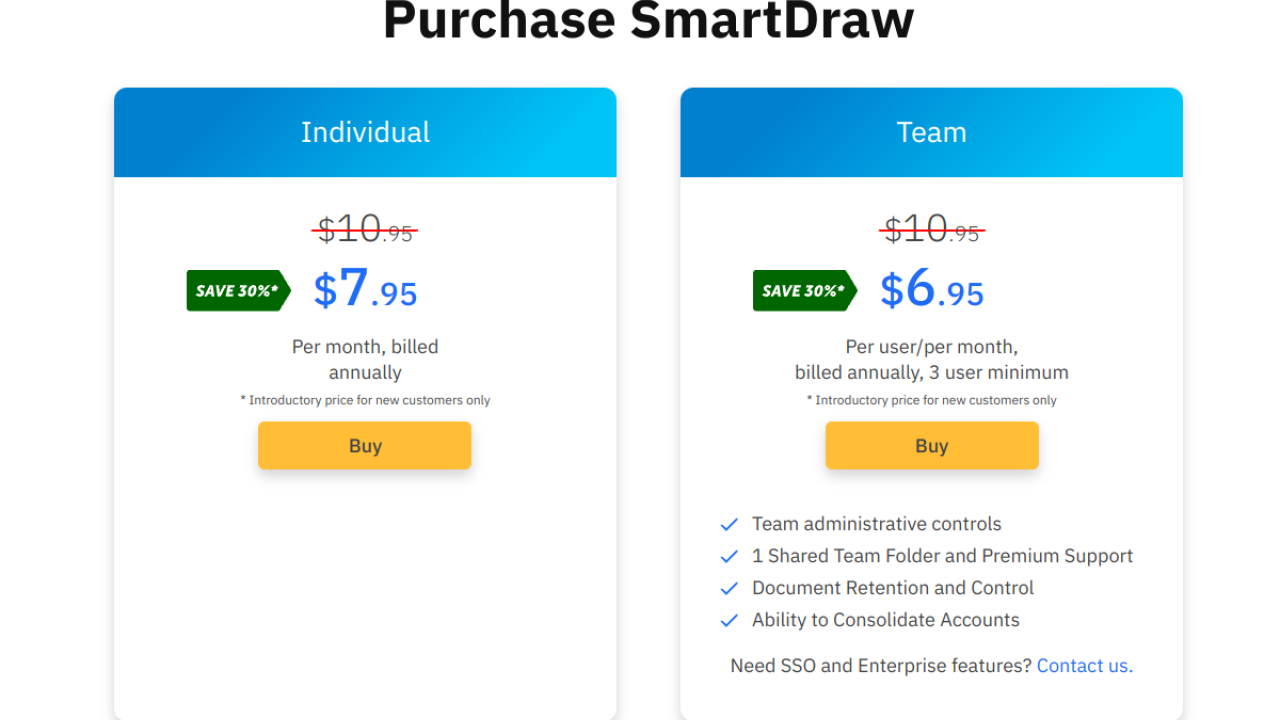
Pricing runs per user on annual billing only, with a minimum seat count on the Team plan, an introductory rate for new customers that later moves to the regular rate, and no free plan beyond a short trial. Operations, facilities and IT teams that live in org charts and floor plans will find it dependable; buyers who specifically want prompt generated diagrams should choose an AI first tool.
Who is SmartDraw Best For?
Operations and facilities teams that want reliable automated diagrams without prompts
SmartDraw Key Features
SmartDraw Pricing & Plans
SmartDraw Review Summary
| Performance Score | B |
| Content Quality | Precise diagrams with strong symbol accuracy, especially org charts and floor plans. |
| Interface | Capable but dated, with a steeper first hour than newer tools. |
| AI Technology | Automation based, with intelligent formatting and data driven generation rather than prompts. |
| Purpose | Reliable business and technical diagramming with automated layout. |
| Compatibility | Web, Desktop |
| Pricing Summary | SmartDraw starts at $10.95/month per user on annual billing at the regular Team rate, with a lower introductory rate for new customers. |
SmartDraw Pros & Cons
✅ Pros
- Auto formatting removes the fiddly alignment work entirely
- Data driven org charts stay current when the source file changes
- Symbol libraries are deep for facilities and engineering drawing
- Long track record and predictable behavior for business teams
- Team plan includes admin controls and premium support
❌ Cons
- No text prompt to diagram generative AI feature
- No free plan, only a short trial
- Annual billing only, with a minimum seat count on the Team plan
- Interface feels dated beside newer AI first tools
FAQs
Is SmartDraw free to use?
▼How does SmartDraw pricing work?
▼Does SmartDraw have AI diagram generation?
▼What diagrams can SmartDraw make?
▼Can SmartDraw build an org chart from a spreadsheet?
▼Which platforms does SmartDraw run on?
▼More AI Tools You Might Like

Figma's whiteboard with AI generation for diagrams, flowcharts and workshop boards from…
View Tool ↗
Diagram as code platform with an AI editor that writes and fixes…
View Tool ↗
Desktop and online diagram software with AI generation, 210+ diagram types and…
View Tool ↗
Budget friendly AI diagram tool with 100+ diagram types and a flat…
View Tool ↗
Professional diagramming software with AI generation, deep shape libraries and strong team…
View Tool ↗
Fast AI flowchart and mind map generator that turns text prompts into…
View Tool ↗
Team whiteboard with AI diagram generation, turning prompts into flowcharts and diagrams…
View Tool ↗
AI diagram tool for technical teams, creating architecture, ER and sequence diagrams…
View Tool ↗