

Brave
✓ VerifiedPrivacy-first browser with the Leo assistant built in, blocking ads and trackers by default and never keeping your chats.
Best For: Privacy-first users who want an AI assistant that does not keep their chats
Brave Quick Facts
| Founded | 2015 by Brendan Eich and Brian Bondy, browser launched 2016 |
| Free Plan | Yes, the browser and basic Leo are free and need no account |
| Top Feature | Leo, a built-in assistant that never keeps or trains on your chats |
| Main Limitation | Free Leo limits shift with traffic, and premium extras are sold one by one |
The Verdict: Brave
Brave is the AI browser for people who like what assistants do but not what they collect. Leo is genuinely useful, the blocking is the best in this category, and the whole thing costs nothing until you choose otherwise. Pay for Leo Premium only when the free limits start interrupting real work. Until then, Brave is an easy switch from Chrome that gives you privacy and an assistant in the same move.
What is Brave?
Brave is a privacy-first browser with an AI assistant called Leo built into the sidebar. Leo can summarise the page in front of you, answer questions, draft text and work through PDFs and documents, and it does all of that without keeping your chats or asking you to create an account. It is one of the tools we track in our best AI browsers roundup at GuideAITools.
The browser around Leo is the bigger story. Brave Shields blocks ads, trackers and fingerprinting by default, so pages load clean and fast, and Brave Search gives you results from an independent index rather than a profile of you. Chat history lives on your own device, temporary chats vanish on close, and you can even plug in your own model if Brave's shelf does not suit you.
The compromises are modest but real. Free Leo limits rise and fall with traffic, premium extras are sold one by one, and the strongest blocking can break a site until you ease it off. If you want an assistant without changing browsers at all, MaxAI adds one to Chrome as an extension, though it cannot match Brave's privacy setup.
The Company Behind Brave
Brave Software was founded in 2015 by Brendan Eich, the creator of JavaScript and a co-founder of Mozilla, together with engineer Brian Bondy. The Brave browser arrived in January 2016 with a blunt pitch: block ads and trackers by default, load pages faster, and end the quiet profiling that funds most of the web. The company has grown around that pitch. Brave added its own independent search engine, private video calls, a VPN and the Leo assistant, which answers and summarises inside the browser without keeping your conversations. Brave's store listings say more than 100 million people use the browser, and the company stays independent, earning from optional premium extras instead of advertising.
Who is Brave Best For?
Privacy-first users who want an AI assistant that does not keep their chats
Brave Key Features
Top Benefits of Brave
How to Use Brave
- Download Brave for your computer or phone and import your bookmarks and passwords
- Browse as normal while Shields blocks ads and trackers in the background
- Open Leo from the sidebar or address bar and ask about the page in front of you
- Turn on temporary chats when you want nothing kept at all
- Add Leo Premium only if you hit the free limits or want the stronger models
Where Brave Fits: Use Cases
- Reading and research without handing your questions to an ad company
- Summarising reports, papers and long reads in the sidebar
- Private drafting help for sensitive work documents
- Cleaner, faster everyday browsing with fewer pop-ups and autoplay ads
- One browser across Windows, Mac, Linux and your phone
- Checking a second model's answer without opening another account
Brave Pricing & Plans
Brave Review Summary
| Performance Score | A |
| Content Quality | Leo answers are solid and sourced from the page or Brave Search, with model choice when one answer is not enough. |
| Interface | Familiar Chromium layout with a busier toolbar than Chrome, Leo one click away in the sidebar. |
| AI Technology | A multi-model assistant routed through Brave's privacy layer, with a bring-your-own-model option for full control. |
| Purpose | Fast, private browsing with an AI assistant that does not build a profile on you. |
| Compatibility | Desktop, Mobile |
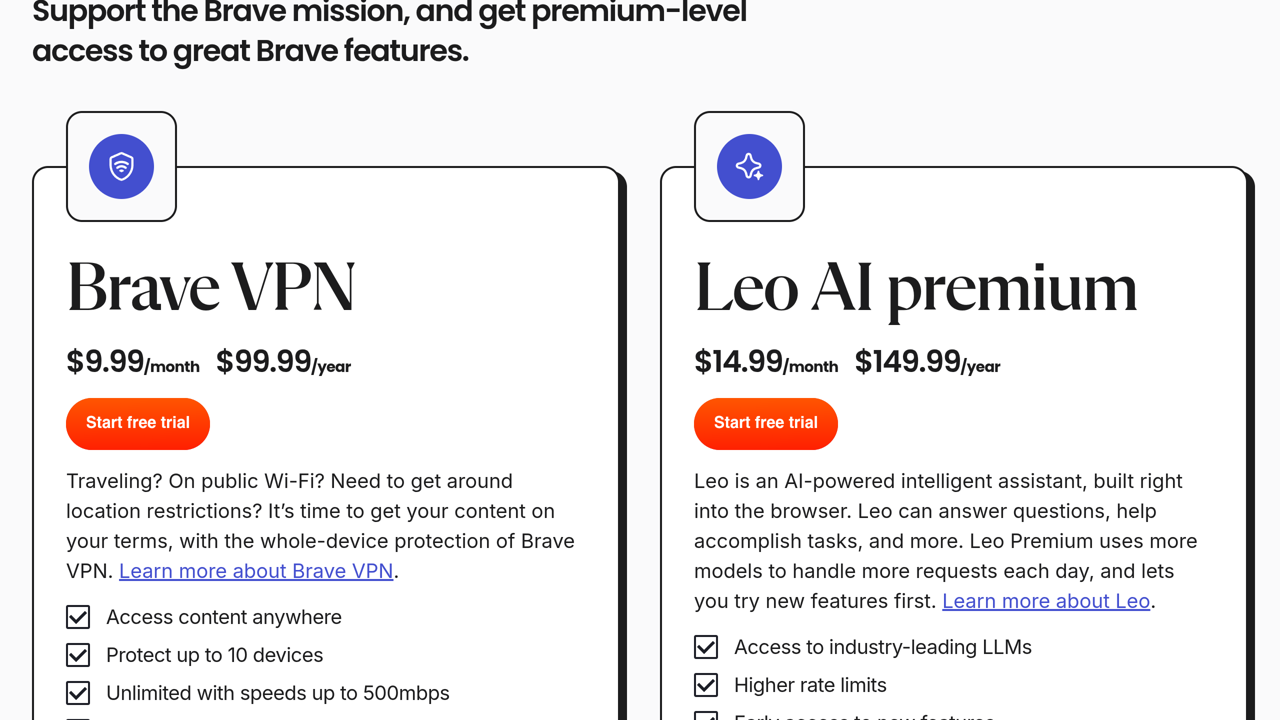
| Pricing Summary | Brave and Leo are free to use with rate limits and no account needed, and Leo Premium costs $14.99/month or $149.99/year for stronger models, higher limits and early features, with a 7-day free trial and cover for up to 5 devices. |
Brave Pros & Cons
✅ Pros
- Privacy is the default setting, not a weekend project
- Leo needs no account and keeps no record of your chats
- Runs on more platforms than any rival here, Linux included
- Pages load fast because the junk never arrives
- One Premium subscription covers up to 5 devices
- The move from Chrome is painless, extensions and all
❌ Cons
- Free Leo limits move with traffic, so heavy users will meet them
- Premium extras come one at a time, with Leo, the VPN, Search and Talk each sold apart
- Strong blocking can break the odd site until you lower Shields for it
- The model shelf changes over time, so a favourite model may not stay
- Built-in extras like Rewards and the crypto wallet feel like clutter until you turn them off
Alternatives to Brave
Perplexity Comet - Answer-first AI browser that digs into research and acts inside the window.
Google Chrome - The familiar default, with Gemini built in and every extension you could want.
Dia - AI browser from the Arc team that chats across your tabs and work tools.
Opera Neon - Opera's agentic browser, built to carry out tasks rather than only answer.
FAQs
What is Brave?
▼Is Brave really free?
▼What is Leo Premium?
▼Does Leo keep my chats?
▼Does Brave work on Linux and phones?
▼Can I use Chrome extensions in Brave?
▼How does Brave make money without ads?
▼More AI Tools You Might Like

AI browser assistant for summarizing pages, chatting with PDFs, writing, translating and…
View Tool ↗
Desktop browser that turns your web apps into organised spaces, with every…
View Tool ↗
AI assistant for chatting with top models, summarizing pages, writing content and…
View Tool ↗
Opera's agentic browser, where AI agents research, browse and build for you…
View Tool ↗
AI browser from Perplexity with a built-in assistant that answers questions across…
View Tool ↗
AI browser from the Arc team that chats across your open tabs,…
View Tool ↗
AI browser sidebar for chat, page summaries, translation, PDF reading, automation and…
View Tool ↗
AI powered browser features for previews, tab cleanup, ChatGPT access and calmer…
View Tool ↗