

Wavebox
✓ VerifiedDesktop browser that turns your web apps into organised spaces, with every account signed in and sorted in one window.
Best For: People who live in web apps and juggle several accounts for work and home
Wavebox Quick Facts
| Founded | 2016, began as WMail, UK |
| Free Plan | Yes, Basic with 2 groups and 2 apps in each group |
| Top Feature | Spaces and groups that keep web apps sorted and signed in side by side |
| Main Limitation | Desktop only, and the unlimited feature set sits on the paid plan |
The Verdict: Wavebox
Wavebox is the easiest recommendation in this category for anyone whose working day is a stack of web apps and accounts. Pro earns its money in calmer mornings and fewer login loops, and the free Basic plan plus the trial week make the test painless. Pick Pro if the trial shows your day getting tidier, and stay on Basic only if your app stack is genuinely small. If your browsing is a handful of sites and tabs have never bothered you, a free mainstream browser will feel lighter. For multi account work, nothing else here comes close.
What is Wavebox?
Wavebox is a Chromium desktop browser that organises web apps into spaces and groups, so the tools you work in all day sit signed in, badged and sorted in one window. Tabs stop being the unit of work. Each app gets a fixed home, its own cookie container and its own notifications, and dashboards gather the widgets you check every morning. It is one of the tools we track in our best AI browsers roundup at GuideAITools.
The daily win is account handling. Separate cookie containers mean two or three accounts for the same service stay live side by side, which is why virtual assistants and agency staff form such a loyal core of users. Brainbox adds an AI assistant for drafting and page questions, sleeping tabs keep memory in check, and the whole setup syncs across machines. Readers who like the idea but will not switch browsers often land on Sider instead, which bolts an AI sidebar onto Chrome or Edge.
The honest limits are scope and habit. Wavebox is desktop only, the free plan is a taster rather than a home, and moving years of bookmarks, extensions and muscle memory into a new browser takes real setup time. For people whose work is a stack of web apps, though, the order it brings is hard to give up once it is running.
The Company Behind Wavebox
Wavebox comes from a small founder owned team in the UK. The founders, Rhys Jones, Thomas Beverley and Susan Davies, first built WMail in 2016, a desktop app for webmail, and Wavebox grew out of that work as people asked for the same tidy home for every web app they used, not just email. The browser moved from Electron to a Chromium base in 2019 and added built in AI early, shipping GPT-3 in 2020. The company stays independent on purpose. It is not VC funded, it runs profitably on subscriptions, and it sells privacy as part of the deal: no ads, no tracking and no data mining, with Google tracking switched off by default. A Teams version and a Spaces relaunch followed in 2023 and 2024 as the product widened from solo users to small companies.
Who is Wavebox Best For?
People who live in web apps and juggle several accounts for work and home
Wavebox Key Features
Top Benefits of Wavebox
How to Use Wavebox
- Download Wavebox for Windows, Mac or Linux and create your account
- Start the free Pro trial, no card needed, and add your first apps from the directory
- Group apps into spaces for work, home and each client
- Sign in to each app once and let the cookie containers keep the sessions apart
- Pin dashboards with the widgets you check every day
- Let sleeping tabs and badges run the day while you switch with the quick switcher
Where Wavebox Fits: Use Cases
- Virtual assistants running several clients from one machine
- Agencies keeping each client account signed in and separate
- Freelancers splitting work and home browsing cleanly
- Support and sales staff living in webmail, CRM and chat tools all day
- Anyone drowning in tabs across Gmail, Slack, Notion and the rest
- Small teams sharing dashboards and app setups
Wavebox Pricing & Plans
Wavebox Review Summary
| Performance Score | B |
| Content Quality | A mature, polished browser that feels finished, with thoughtful touches in every corner rather than headline gimmicks. |
| Interface | A calm sidebar of apps and spaces that takes an hour to learn and then disappears into the background. |
| AI Technology | Brainbox, a built in assistant for writing and page questions, layered over a Chromium base rather than rebuilt around AI. |
| Purpose | Turning a scattered pile of web apps and accounts into one organised desktop home. |
| Compatibility | Desktop |
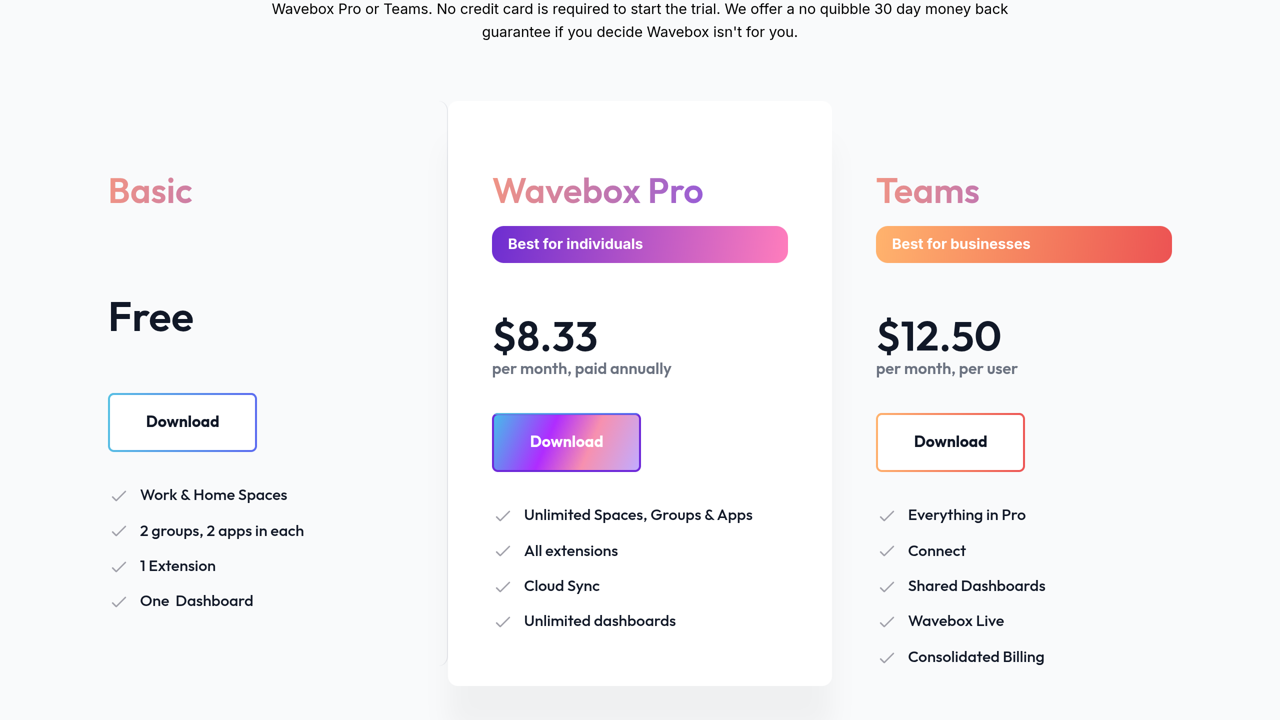
| Pricing Summary | Wavebox Basic is free with 2 groups and 2 apps in each, Pro costs $8.33 per month paid annually with unlimited spaces, groups and apps plus cloud sync, and Teams runs $12.50 per month per user with shared dashboards and consolidated billing. |
Wavebox Pros & Cons
✅ Pros
- Genuinely ends tab chaos for people who work in web apps all day
- Several accounts for the same service stay signed in at the same time
- Strong privacy stance, with no ads, no tracking and no data sales
- Generous free trial and a free Basic plan to fall back on
- Fast, human support that reviewers praise often
- Independent and profitable, so the product is not chasing growth at your expense
❌ Cons
- The free Basic plan is tight, with only 2 groups and 2 apps in each
- Pro is another subscription for a category most people expect to be free
- Desktop only, with no mobile app to carry your setup
- Moving years of browser habits over takes an afternoon of setup
- Heavy app stacks can still strain older machines, even with sleeping tabs
Alternatives to Wavebox
Perplexity Comet - AI first browser that answers and acts, for people who want an assistant rather than an organiser.
Google Chrome - The default browser Wavebox replaces, free and familiar but with no real answer to tab overload.
Brave - Privacy first browser with an AI assistant, closer to a standard browser than a work hub.
Dia - AI browser built around chat with your tabs, Mac only and lighter on organisation.
FAQs
What is Wavebox?
▼Is Wavebox free?
▼How much does Wavebox cost?
▼Is Wavebox a Chrome extension?
▼Can I stay signed in to two accounts for the same app?
▼Which systems does Wavebox run on?
▼Is Wavebox private?
▼More AI Tools You Might Like

AI powered browser features for previews, tab cleanup, ChatGPT access and calmer…
View Tool ↗
Privacy-first browser with the Leo assistant built in, blocking ads and trackers…
View Tool ↗
AI browser from the Arc team that chats across your open tabs,…
View Tool ↗
AI browser assistant for summarizing pages, chatting with PDFs, writing, translating and…
View Tool ↗
Cloud platform that rents headless browsers to AI agents by the hour,…
View Tool ↗
Open source library that lets AI agents drive a real browser from…
View Tool ↗
AI browser agent for summaries, web automation, page monitoring, SEO, email replies…
View Tool ↗
Agentic AI browser that plans multi-step tasks, shows you the workflow before…
View Tool ↗