

Claude Code
✓ VerifiedAnthropic's terminal-first coding agent that reads your whole repo, edits across files and runs tests under your direction.
Best For: Developers who want a terminal agent that takes on whole tasks across a large codebase
Claude Code Quick Facts
| Founded | 2021 (Anthropic) |
| Free Plan | None for Claude Code, it is included only with paid Claude plans |
| Top Feature | Terminal agent that reads the whole repository, edits across files and runs commands |
| Main Limitation | Usage is shared with Claude chat, so long sessions can hit plan limits |
| Company Background | Anthropic is an AI research company founded in San Francisco in 2021 by former OpenAI researchers, including Dario and Daniela Amodei. It builds the Claude family of models and sells them through chat subscriptions, a developer platform and the Claude Code agent. Claude Code began as an internal tool, reached developers as a research preview in early 2025, and has since become the company's flagship developer product, expanding from the terminal into IDE extensions, a desktop app and the web. |
The Verdict: Claude Code
Claude Code is the strongest terminal agent in this roundup for developers who think in tasks rather than lines. If your work is mostly small edits inside one file, it is more machinery than you need, but for refactors, migrations and stubborn bugs it earns its subscription.
What is Claude Code?
Claude Code is Anthropic's coding agent, built to take on whole tasks rather than finish your current line. You describe what you want in the terminal, and it reads the repository, plans the change, edits files across the project, runs the tests and reports back, asking for approval at the points you set. It is one of the picks in our guide to the best AI coding tools, and the one most associated with serious multi-file work.
The same agent now appears in several places: the CLI, a VS Code extension with inline diffs, a JetBrains plugin, a desktop app and the web. What it deliberately does not do is classic autocomplete, so for many developers it complements an editor assistant rather than replacing one. The closest rival in spirit is OpenAI Codex, which leans harder on cloud delegation, while Claude Code keeps the work on your own machine by default.
Billing is simple to explain and easy to underestimate. Claude Code rides on a Claude subscription and shares one usage pool with your chats, so a heavy week of coding can crowd out everything else you use Claude for. The tiers mostly buy headroom rather than features, which makes the right plan a question of how many hours a day the agent will actually run.
Who is Claude Code Best For?
Developers who want a terminal agent that takes on whole tasks across a large codebase
Claude Code Key Features
Top Benefits of Claude Code
How to Use Claude Code
- Install the Claude Code CLI or the extension for your IDE
- Sign in with a paid Claude plan or an Anthropic Console account
- Open your project folder and start a session in the terminal
- Describe the task and let the agent read the repo and propose a plan
- Approve edits, check the diffs and run the tests it suggests
Where Claude Code Fits: Use Cases
- Fixing bugs that span several services or packages
- Large refactors and framework migrations
- Writing and repairing test suites
- Onboarding to an unfamiliar codebase by asking questions
- Automating repetitive maintenance with hooks and scripts
Claude Code Pricing & Plans
Claude Code Review Summary
| Performance Score | A |
| Content Quality | Careful, well explained changes with strong reasoning about existing code |
| Interface | Terminal first, with tidy IDE extensions and a desktop app |
| AI Technology | Anthropic Claude models, including the Fable and Opus lines |
| Purpose | Delegating whole coding tasks to an agent that works across a repository |
| Compatibility | Terminal on macOS, Windows and Linux, VS Code, JetBrains IDEs, desktop and web |
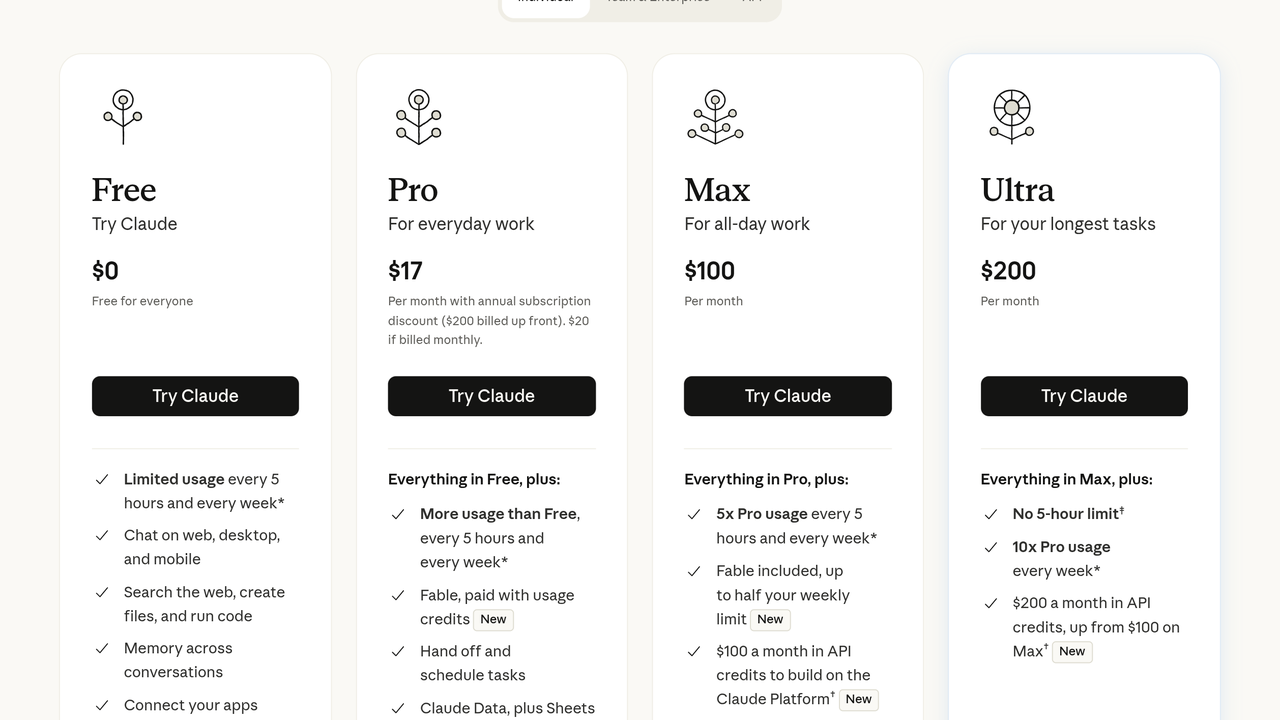
| Pricing Summary | Claude Code is included with paid Claude plans, with Pro at $17 per month on annual billing, Max at $100 per month and Ultra at $200 per month. |
Claude Code Pros & Cons
✅ Pros
- Exceptional at large, multi-file tasks
- Works in the terminal you already live in
- Strong reasoning about unfamiliar codebases
- Same subscription covers chat, web and coding
- Checkpoints and plan mode keep big changes reviewable
- New Claude model releases flow straight into the tool
❌ Cons
- No access on the free Claude plan
- No classic inline autocomplete while you type
- Usage shared with chat means coding can eat your chat allowance
- Terminal first design is a learning curve for GUI focused developers
- Costs climb steeply if you need the top tiers for daily heavy use
Alternatives to Claude Code
OpenAI Codex - OpenAI's agent across cloud, CLI and IDE, with delegated tasks that return as pull requests.
Cursor - An AI-first editor with an agent that works inside a graphical workspace.
GitHub Copilot - The editor assistant with the widest IDE support, classic autocomplete included.
Aider - A free open-source terminal pair programmer that runs on your own API keys.
FAQs
Is Claude Code included with Claude Pro?
▼Can I use Claude Code for free?
▼What is the difference between Max and Ultra?
▼Does Claude Code work in my IDE?
▼Does Claude Code autocomplete code as I type?
▼Which languages does Claude Code support?
▼What happens when I hit my usage limit?
▼More AI Tools You Might Like

OpenAI's coding agent for delegating tasks to the cloud, the terminal and…
View Tool ↗
Cursor is an AI-native code editor forked from VS Code that provides…
View Tool ↗
Windsurf is an AI code editor formerly known as Codeium, now owned…
View Tool ↗
Open-source VS Code coding agent that works with your own API keys,…
View Tool ↗
Privacy-first AI code assistant built for enterprise teams, with on-prem and air-gapped…
View Tool ↗
Amazon Q Developer, formerly CodeWhisperer, is AWS's AI coding assistant with inline…
View Tool ↗
Replit is a cloud-based coding and deployment platform with built-in Ghostwriter AI…
View Tool ↗
Free and open source AI pair programming in your terminal, built on…
View Tool ↗