

OpenAI Codex
✓ VerifiedOpenAI's coding agent for delegating tasks to the cloud, the terminal and your IDE, with work returned as pull requests.
Best For: Developers who want to delegate coding tasks to the cloud and review the pull requests
OpenAI Codex Quick Facts
| Founded | 2015 (OpenAI) |
| Free Plan | The free ChatGPT plan includes limited Codex access for quick coding tasks |
| Top Feature | Cloud tasks that run in parallel and come back as pull requests for review |
| Main Limitation | Usage limits depend on plan and task size, and heavy work pushes you up the tiers |
| Company Background | OpenAI is an AI research and deployment company founded in San Francisco in 2015, known first for the GPT model family and for ChatGPT. The Codex name dates back to its early code generation models, and it returned in 2025 for a software engineering agent that takes delegated tasks into the cloud. Codex is now sold as part of ChatGPT rather than as a separate product, and it sits alongside the developer API as one of the company's two main routes for working developers. |
The Verdict: OpenAI Codex
Codex is the delegation play in this category: hand it well scoped tickets and judge it on the pull requests that come back. Developers who want an agent beside them in the editor all day may prefer a local tool, but for parallel, reviewable work it is hard to beat.
What is OpenAI Codex?
OpenAI Codex is a software engineering agent that you delegate work to instead of pairing with line by line. Give it a task and it spins up an isolated cloud environment, writes the code, runs checks and opens a pull request for your review, while a CLI and an IDE extension cover the work you would rather keep local. It is one of the picks in our guide to the best AI coding tools, and the most cloud-first option in it.
There is no separate Codex subscription to buy. Access rides on ChatGPT plans, from a limited free taste up through tiers aimed at people who delegate all day, and teams get workspaces with admin controls. Compared with Claude Code, which runs on your machine inside your terminal, Codex bets that the future of agent work is asynchronous: several tasks running in parallel while you do something else.
The trade-offs are about control and predictability. Cloud tasks depend on OpenAI environments and queues, usage limits are expressed as estimates that shift with task size, and the experience is at its best inside a GitHub centered workflow. For teams that already review everything as pull requests, though, the fit is natural.
Who is OpenAI Codex Best For?
Developers who want to delegate coding tasks to the cloud and review the pull requests
OpenAI Codex Key Features
Top Benefits of OpenAI Codex
How to Use OpenAI Codex
- Sign in to ChatGPT on a plan that includes Codex
- Connect your GitHub account and pick a repository
- Describe a task in Codex on the web, in the CLI or in your IDE
- Let the agent work in its cloud environment and open a pull request
- Review the diff, request changes and merge when it looks right
Where OpenAI Codex Fits: Use Cases
- Delegating well defined tickets while you do other work
- Getting a first pass code review on every pull request
- Prototyping features in parallel branches
- Fixing lint, type errors and failing tests across a repo
- Small teams covering more ground with the same headcount
OpenAI Codex Pricing & Plans
OpenAI Codex Review Summary
| Performance Score | A |
| Content Quality | Solid task work with pull requests that explain their own changes |
| Interface | Clean web app, capable CLI and a light IDE extension |
| AI Technology | OpenAI GPT models tuned for software engineering tasks |
| Purpose | Delegating coding work to cloud agents and reviewing the results |
| Compatibility | Web, ChatGPT desktop app, CLI, IDE extensions and iOS |
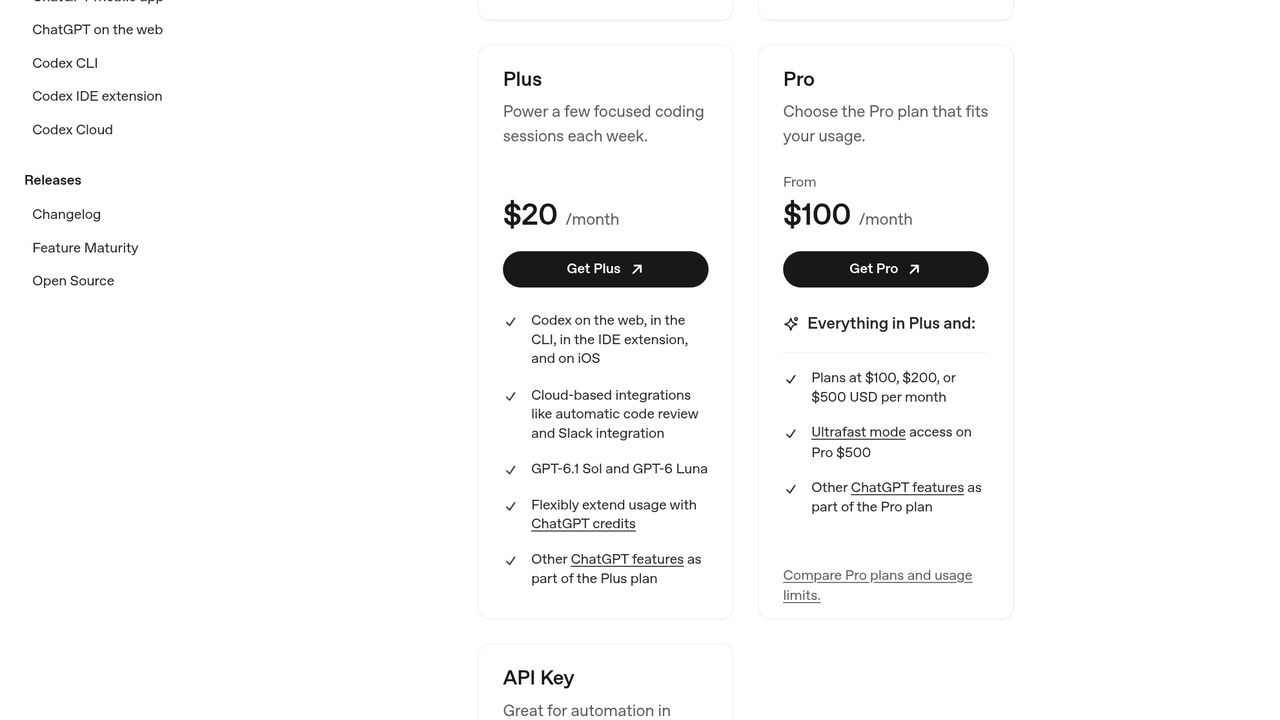
| Pricing Summary | Codex is included with ChatGPT plans, from limited free access for quick coding tasks to Plus at $20 per month, Pro from $100 per month and Business at $20 per user per month billed annually. |
OpenAI Codex Pros & Cons
✅ Pros
- Cloud delegation frees up your machine and your attention
- Pull request workflow fits how teams already review code
- Generous higher tiers for heavy daily use
- One plan covers chat, agents and the rest of ChatGPT
- Strong sandboxing story for unattended tasks
- API key mode suits CI pipelines
❌ Cons
- Free tier access is limited to light exploration
- Usage limits are estimates that vary with task size, which makes planning harder
- Best experience needs a GitHub centered workflow
- Cloud tasks depend on OpenAI availability and queues
- API key usage is billed separately from any plan
Alternatives to OpenAI Codex
Claude Code - Anthropic's terminal agent, included with Claude subscriptions instead of ChatGPT plans.
Cursor - An AI-first editor for developers who want the agent inside the editor itself.
GitHub Copilot - The most widely adopted editor assistant, from GitHub and Microsoft.
Google Antigravity - Google's agent-first development platform with a free tier for individuals.
FAQs
Is Codex included with ChatGPT?
▼Can I use Codex on the free plan?
▼What does Codex do with a task?
▼Does Codex work outside the browser?
▼What is the difference between Plus and Pro?
▼Can teams use Codex?
▼Can I use Codex with an API key instead?
▼More AI Tools You Might Like

Windsurf is an AI code editor formerly known as Codeium, now owned…
View Tool ↗
GitHub Copilot is Microsoft's AI coding assistant that writes, completes, and debugs…
View Tool ↗
Replit is a cloud-based coding and deployment platform with built-in Ghostwriter AI…
View Tool ↗
AWS spec-driven agentic IDE that turns a prompt into requirements, a design…
View Tool ↗
Anthropic's terminal-first coding agent that reads your whole repo, edits across files…
View Tool ↗
Free and open source AI pair programming in your terminal, built on…
View Tool ↗
Privacy-first AI code assistant built for enterprise teams, with on-prem and air-gapped…
View Tool ↗
Amazon Q Developer, formerly CodeWhisperer, is AWS's AI coding assistant with inline…
View Tool ↗