

Kiro
✓ VerifiedAWS spec-driven agentic IDE that turns a prompt into requirements, a design and a task list, then has agents build and verify the result.
Best For: Teams that want features planned as written specs before any code gets written
Kiro Quick Facts
| Founded | Launched by AWS in July 2025 |
| Free Plan | A perpetual free tier with a monthly credit allowance and strong included models |
| Top Feature | Specs that turn a prompt into requirements, design and tasks before building starts |
| Main Limitation | Credit metering makes heavy agent work a running cost you have to watch |
| Company Background | Kiro launched in July 2025 from Amazon Web Services, arriving as a public preview at the AWS Summit in New York and reaching general availability later that year. It was not a rework of an older product. AWS built it as a ground up answer to vibe coding, betting that written specs would keep agent output honest. AWS has since named Kiro the successor to its earlier assistant, Amazon Q Developer, which is heading for end of support, so Kiro is now the company's flagship tool for developers. |
The Verdict: Kiro
Kiro is the right pick for developers and teams who would rather argue about a spec for ten minutes than debug an agent's guesswork for an hour. The free tier is capable enough to learn the workflow properly. Adopt it for planned feature work and shared codebases, and keep a lighter tool around for throwaway scripts. If your work is mostly quick edits and experiments, the spec step will feel like friction, and a simpler editor agent will suit you better.
What is Kiro?
Kiro is an agentic development system from AWS built around one idea: plan before you build. A prompt is first turned into a spec, with requirements written in plain language, a design that records the technical choices, and a task list the agents then work through. It is one of the picks in our guide to the best AI coding tools, and it is the most process minded tool in that lineup.
The workflow continues past the spec. Steering files teach Kiro your stack and conventions, hooks fire off tests and documentation when files change, and workflows break long jobs into checked steps. It is also the tool AWS points its own users to: anyone leaving Amazon Q Developer lands here, since AWS has set that assistant on an end of support path and named Kiro as its successor.
The cost of the structure is overhead and metering. Small fixes do not need a design document, and credits spend at different rates depending on the model and the size of the task, so heavy users have to watch the gauge. For teams building features that must be right, though, the spec habit is exactly the discipline that prompt and patch tools lack.
Who is Kiro Best For?
Teams that want features planned as written specs before any code gets written
Kiro Key Features
Top Benefits of Kiro
How to Use Kiro
- Download the Kiro IDE or open Kiro on the web and sign in
- Describe the feature you want in plain words
- Read the requirements, design and task list Kiro drafts, and edit them until they match your intent
- Approve the spec and let the agent work through the tasks
- Review the code, test results and checkpoints it reports at each step
- Refine the spec for the next feature instead of starting from a blank prompt
Where Kiro Fits: Use Cases
- Building a new service where the requirements matter as much as the code
- Adding a feature to a large codebase without breaking its conventions
- Turning a rough product idea into a working prototype with documents included
- Teams standardising how agents are briefed, checked and reviewed
- Migrating work off Amazon Q Developer before its end of support
- Regulated work where a written trail of intent helps audits
Kiro Pricing & Plans
Kiro Review Summary
| Performance Score | B |
| Content Quality | Clear, structured documentation and honest pricing pages, with the credit system explained in unusual detail. |
| Interface | A familiar VS Code based editor with the spec documents front and centre, plus web and mobile companions. |
| AI Technology | Spec-driven agents with steering files, hooks and workflows, routing work across Claude, GPT and open weight models. |
| Purpose | Turning intent into reviewed specs, then into verified code, for developers and teams who plan before they build. |
| Compatibility | Web, Mobile, Desktop |
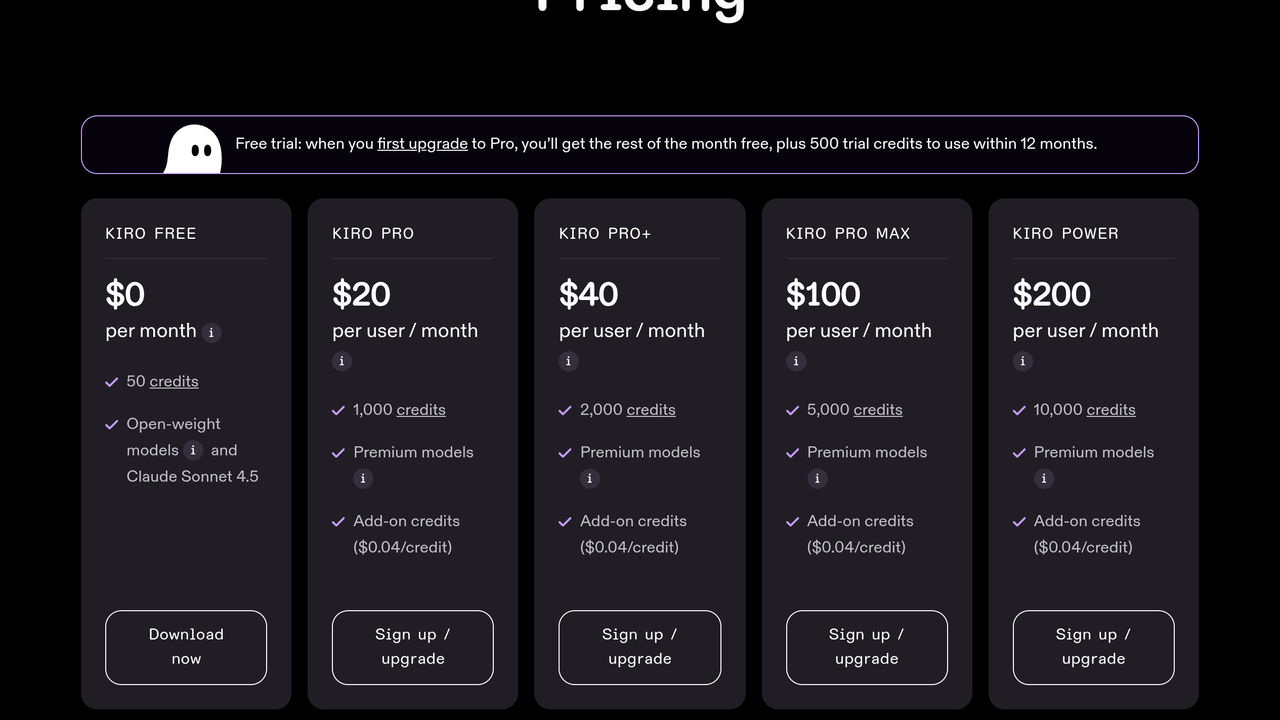
| Pricing Summary | Kiro Free costs $0 with 50 credits a month, Pro is $20 a month for 1,000 credits, Pro Plus is $40 for 2,000 credits, Pro Max is $100 for 5,000 credits and Power is $200 for 10,000 credits, with add-on credits at $0.04 each and 500 trial credits arriving with the first paid upgrade. |
Kiro Pros & Cons
✅ Pros
- The spec workflow catches misunderstandings before they become code
- A real free tier with capable models included, not a crippled demo
- IDE, CLI, web and mobile surfaces share one subscription
- Strong model menu, with an Auto router for people who do not want to choose
- Team pooling and admin controls suit company rollouts
- Built and backed by AWS, with a clear future as its flagship developer tool
❌ Cons
- Writing and reviewing specs adds a step that quick fixes do not need
- Credits drain at different rates per model, so costs take watching
- Plan credits do not roll over for individuals, unused allowance is lost
- The credit system takes a little learning compared with a flat subscription
- A young product whose plans and surfaces are still changing
Alternatives to Kiro
Google Antigravity - Google's free agent-first platform, spreading agents across an app, a CLI and an IDE.
Amazon Q Developer - AWS's earlier assistant, now heading for end of support as Kiro takes its place.
Replit - Browser based app building with an agent, no local IDE and no spec documents.
Cursor - Editor first agent experience, without Kiro's spec documents and task lists.
FAQs
What is Kiro?
▼Is Kiro free?
▼How does Kiro pricing work?
▼What is a Kiro credit?
▼Is Kiro replacing Amazon Q Developer?
▼Which models does Kiro use?
▼Where can I use Kiro?
▼More AI Tools You Might Like

AI assistant and coding agents inside JetBrains IDEs, with chat, completion and…
View Tool ↗
Replit is a cloud-based coding and deployment platform with built-in Ghostwriter AI…
View Tool ↗
Anthropic's terminal-first coding agent that reads your whole repo, edits across files…
View Tool ↗
OpenAI's coding agent for delegating tasks to the cloud, the terminal and…
View Tool ↗
Free and open source AI pair programming in your terminal, built on…
View Tool ↗
Privacy-first AI code assistant built for enterprise teams, with on-prem and air-gapped…
View Tool ↗
Google agent-first coding platform across an app, a CLI and an agentic…
View Tool ↗
Windsurf is an AI code editor formerly known as Codeium, now owned…
View Tool ↗