

Apidog
✓ VerifiedAll-in-one API platform that puts design, debugging, testing, mocking and documentation in a single workspace.
Best For: Small teams that want design, testing and docs in one app at a low per-seat price
Apidog Quick Facts
| Founded | 2022 |
| Free Plan | Yes, full core features for up to 4 users |
| Top Feature | Smart mock that generates readable data from your schemas |
| Main Limitation | Governance and enterprise controls are thinner than Stoplight or SwaggerHub |
| Company Background | Apidog was founded in 2022 and is developed by Apidog Pte. Ltd., registered in Singapore. The company built its name on a simple bet: that most teams would rather design, debug, test, mock and document an API in one workspace than keep four separate tools in sync. That all-in-one approach has made it a regular pick in best API tool roundups since its launch. |
The Verdict: Apidog
Apidog is the easiest recommendation on this page for a small team: one workspace, one low seat price, and no sync work between design, testing and docs. Grow into a governance-heavy platform later if you ever need one. Most small teams will not.
What is Apidog?
Apidog is an all-in-one API platform that covers the full lifecycle in one workspace: you design the spec visually, debug it in the built-in client, test it with automated scenarios, mock it for the front-end team and publish the documentation, all from the same project. It is one of the picks in our roundup of the best AI API design tools, where it takes the best value slot for small teams.
The idea it sells is the end of export and sync work. In a classic stack the spec lives in one tool, the requests in Postman, the mocks in a third service and the docs in a fourth, and every change has to be repeated four times. In Apidog the design is the single source, so the client, the tests, the smart mock and the published docs all read from the same endpoints and schemas.
The limits are the ones young platforms usually carry. Governance, audit depth and enterprise controls trail the older governance specialists, and the company has a shorter track record with large buyers. For a small team that feels the four-tool tax every week, those limits are a fair trade for the price.
Who is Apidog Best For?
Small teams that want design, testing and docs in one app at a low per-seat price
Apidog Key Features
Top Benefits of Apidog
How to Use Apidog
- Create a project and design endpoints in the visual editor, or import an OpenAPI file
- Add schemas and examples so mocks and docs generate themselves
- Send requests in the built-in client and build test scenarios against the design
- Publish the interactive documentation on your own domain
- Invite the team and use sprint branches to review changes before they merge
Where Apidog Fits: Use Cases
- Small product teams shipping their first public API
- Replacing separate design, client and documentation tools with one subscription
- Front-end teams building against smart mocks before the backend lands
- QA teams turning specs into automated test scenarios
Apidog Pricing & Plans
Apidog Review Summary
| Performance Score | B |
| Content Quality | Docs and test output are clean and stay in sync with the spec by construction |
| Interface | A dense but well organised workspace that rewards a short learning curve |
| AI Technology | AI help for spec drafting and documentation inside the same editor |
| Purpose | An all-in-one API workspace for small teams that want one tool for the whole lifecycle |
| Compatibility | Web and desktop apps, CLI, IntelliJ plugin, OpenAPI import and export |
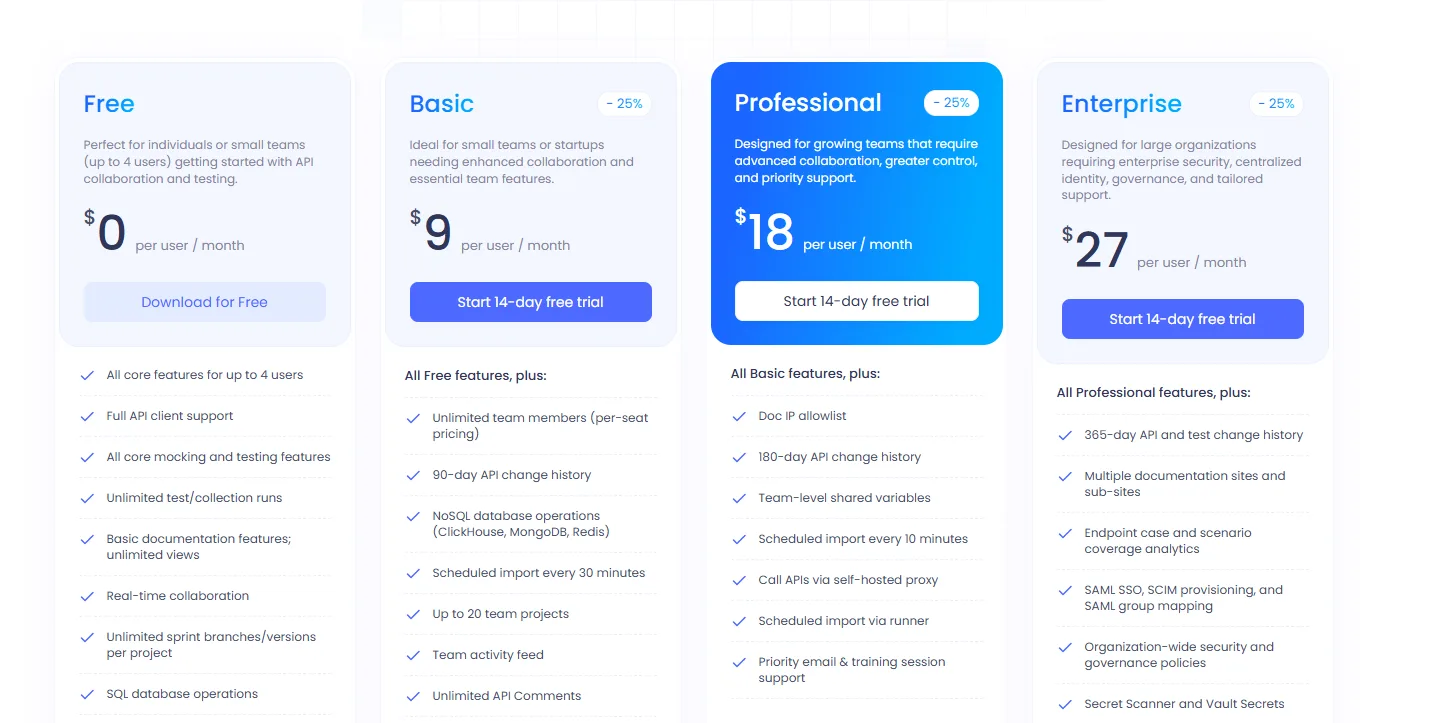
| Pricing Summary | Apidog is free for up to 4 users, and paid plans run per user per month: Basic at $9, Professional at $18 and Enterprise at $27, with an on-premises edition sold through sales. |
Apidog Pros & Cons
✅ Pros
- Design, testing, mocking and docs genuinely live in one app
- Generous free plan for up to four users
- Low per-seat pricing on every paid tier
- Smart mock data reads like real API responses
- Desktop and web apps with real-time collaboration
❌ Cons
- Governance is lighter than Stoplight or SwaggerHub
- Younger company with a shorter enterprise track record
- Cloud mock calls are capped per plan
- On-premises deployment sits in the top enterprise tier
Alternatives to Apidog
Postman - The bigger all-round platform, with design added to a test-first workspace.
Stoplight - The design-first pick when governance and style guides matter most.
Insomnia - A lighter client with a spec editor, better for solo developers.
Swagger - SmartBear's hosted SwaggerHub platform for enterprise OpenAPI governance.
FAQs
Is Apidog free?
▼What does Apidog replace?
▼Can I import my existing APIs?
▼Does Apidog have mock servers?
▼Can Apidog run tests in CI?
▼Is there an on-premises version?
▼More AI Tools You Might Like

API design and documentation platform built around the OpenAPI Specification for fast…
View Tool ↗
Postman is the world's leading API platform for designing, testing, documenting, and…
View Tool ↗
Open source API client that stores collections as plain text files in…
View Tool ↗
API client for testing REST, GraphQL, gRPC, SOAP, WebSocket, SSE and MCP…
View Tool ↗
Google Cloud API management platform for securing, managing, monitoring and scaling APIs.
View Tool ↗
SDK generation platform that turns an OpenAPI spec into typed, published client…
View Tool ↗
API design and documentation platform for OpenAPI, style guides, governance and team…
View Tool ↗
API documentation platform that builds branded developer portals from OpenAPI specs, with…
View Tool ↗