

MaxAI
✓ VerifiedAI browser assistant for summarizing pages, chatting with PDFs, writing, translating and replying faster.
Best For: Professionals who want AI help on any webpage
The Verdict: MaxAI
MaxAI is a strong AI browser assistant for people who want quick help with reading, writing, translating and replying online. It is simple enough for daily use, but the Pro plan gives enough power for heavier web research and content workflows.
For GuideAITools, MaxAI should be listed as a practical AI productivity extension for web users, students and business professionals. Its main weakness is that advanced value sits behind the paid plan, and the refund policy is strict. I would recommend it for users who spend much of their day inside Chrome or Edge and want AI tools close to their normal browsing.
What is MaxAI?
MaxAI is an AI browser assistant that helps users read, understand, write and reply across websites. It works as a Chrome and Edge extension, with a web app also listed on the pricing page.
The tool is built for common browser tasks. You can summarize webpages, summarize YouTube videos, chat with PDFs, analyze images, search the web, translate pages, fix grammar, rewrite text and draft replies for Gmail, Outlook, LinkedIn, WhatsApp and other platforms.
MaxAI is best for professionals and students who want AI support inside the browser rather than a separate chatbot tab. Its homepage lists 1 million plus active users and 14,000 plus 5 star ratings, which makes it a strong listing candidate for GuideAITools.
Who is MaxAI Best For?
Professionals who want AI help on any webpage
MaxAI Key Features
MaxAI Pricing & Plans
MaxAI Review Summary
| Performance Score | A |
| Content Quality | Strong for webpage summaries, YouTube summaries, PDF chat, writing fixes, translation and email replies. |
| Interface | The extension works directly on web pages, which makes it quick for reading, writing and replying. |
| AI Technology | MaxAI connects users with free and Pro AI models, image generation, file uploads and web search support. |
| Purpose | It helps users read faster, understand pages and write better across websites. |
| Compatibility | Web, Extension |
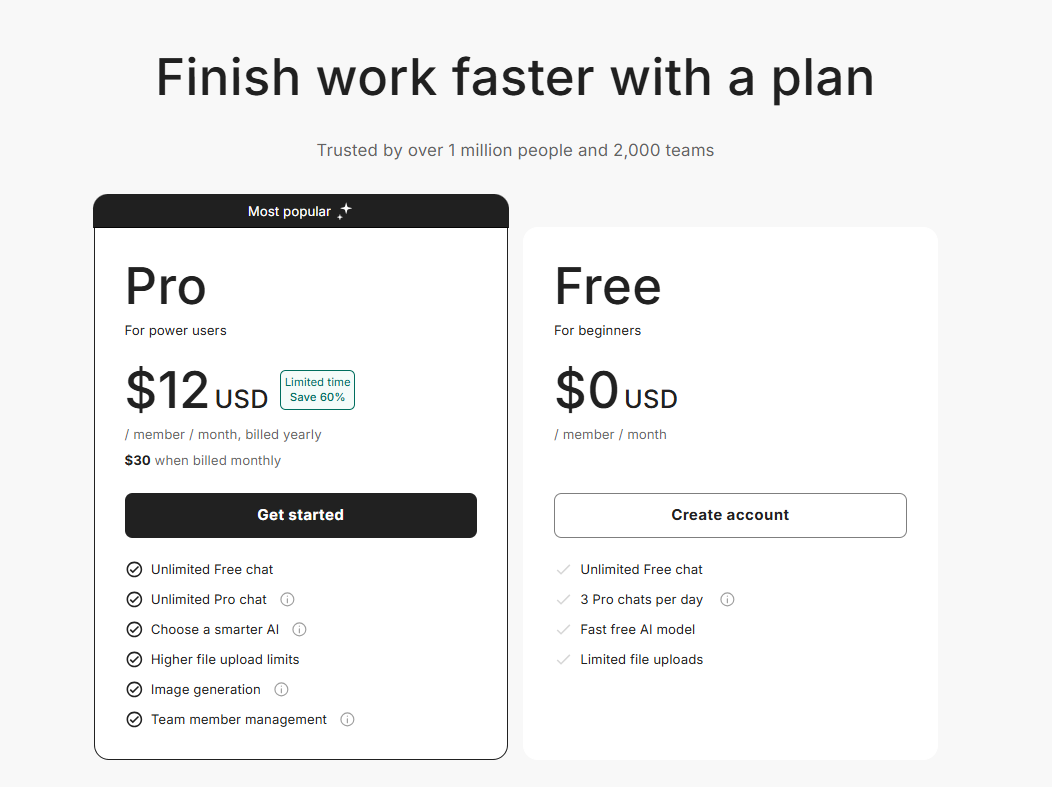
| Pricing Summary | MaxAI has a Free plan and a Pro plan at $12 per member per month billed yearly, or $30 when billed monthly. |
MaxAI Pros & Cons
✅ Pros
- Free basic features are available
- Works on Chromium based browsers like Chrome and Edge
- Strong for reading, writing, summaries and replies
- Supports PDFs, YouTube videos, images and files
- Pro plan gives unlimited Pro chat
- Paid plans support team members
- Clear yearly and monthly pricing is listed
❌ Cons
- Advanced features require upgrade
- Free plan allows only 3 Pro chats per day
- All payments are final and non refundable
- Not designed for API or automation developers
- Account sharing and programmatic use are not allowed
Alternatives to MaxAI
Sider - The closest rival sidebar, with a similar all in one assistant for Chrome and Edge.
Merlin AI - An AI assistant extension with a similar chat, write and summarize toolkit.
Harpa AI - A sidebar agent that leans harder into web automation and page monitoring.
Perplexity Comet - A whole AI browser, if you would rather switch than add an extension.
FAQs
What is MaxAI used for?
▼Is MaxAI free to use?
▼What platforms does MaxAI support?
▼Who is MaxAI best for?
▼Does MaxAI offer a free trial?
▼More AI Tools You Might Like

AI browser agent for summaries, web automation, page monitoring, SEO, email replies…
View Tool ↗
Agentic AI browser that plans multi-step tasks, shows you the workflow before…
View Tool ↗
AI assistant for chatting with top models, summarizing pages, writing content and…
View Tool ↗
Open source library that lets AI agents drive a real browser from…
View Tool ↗
Cloud platform that rents headless browsers to AI agents by the hour,…
View Tool ↗
AI browser from the Arc team that chats across your open tabs,…
View Tool ↗
AI powered browser features for previews, tab cleanup, ChatGPT access and calmer…
View Tool ↗
AI browser sidebar for chat, page summaries, translation, PDF reading, automation and…
View Tool ↗