

ReadMe
✓ VerifiedDeveloper hub platform that turns API references into interactive hubs with guides, changelogs and per-developer usage analytics.
Best For: API companies that want one hub for reference docs, guides and developer analytics
ReadMe Quick Facts
| Founded | 2014 |
| Free Plan | Yes, a Starter plan at no cost |
| Top Feature | Per-developer analytics showing exactly how each user calls your API |
| Main Limitation | The full AI feature set is split between the Pro plan and paid add-ons |
| Company Background | ReadMe was founded in 2014 by Gregory Koberger in San Francisco and went through Y Combinator. It grew from a simple idea, that API documentation should behave like a product, into a developer hub platform used by thousands of API companies, pairing reference docs with guides, changelogs and analytics that show how individual developers actually use an API. |
The Verdict: ReadMe
ReadMe is the developer hub to buy when documentation drives your API's adoption: interactive reference, guides, changelog and usage analytics in one place, starting from a free plan. Just budget for the add-ons if you want the full AI feature set.
What is ReadMe?
ReadMe turns an API reference into a full developer hub: the interactive reference generated from your OpenAPI spec sits alongside guides, tutorials and a changelog, and behind it all runs analytics that show how each developer actually calls your API. In our roundup of the best AI API design tools it takes the developer hub slot, the pick for API companies whose docs are their main growth channel.
Its signature trick is personalisation. A signed-in reader sees examples filled with their own API keys, so the first call they copy usually just works, and the per-developer analytics tell the API owner exactly who is active, which endpoints they hit and where their calls fail. The docs-first comparison most teams run is against Redocly, which gates spec quality harder, where ReadMe invests in the reader's journey after the spec is published.
The watch-outs are commercial rather than technical. The AI features are spread between the Pro plan and paid add-ons, per-project pricing stacks up for companies running many APIs, and admin seats beyond the included five cost extra each month. None of that matters to a single-API company, which is exactly who ReadMe serves best.
Who is ReadMe Best For?
API companies that want one hub for reference docs, guides and developer analytics
ReadMe Key Features
Top Benefits of ReadMe
How to Use ReadMe
- Create a project and import your OpenAPI spec
- Let the reference generate itself, then add guides and a changelog around it
- Connect your domain and match the hub to your brand
- Watch the analytics to see which endpoints developers actually call
- Turn on the AI Linter and Writer when the docs outgrow manual upkeep
Where ReadMe Fits: Use Cases
- API companies replacing a static docs page with a real developer hub
- Support teams cutting tickets with searchable, AI-assisted docs
- Developer relations teams tracking adoption per customer
- Growing APIs that need versioning and changelogs readers trust
ReadMe Pricing & Plans
ReadMe Review Summary
| Performance Score | B |
| Content Quality | Hubs read like a product site, with reference, guides and changelog kept in one voice |
| Interface | A clean editor and reader experience that non-technical writers can run |
| AI Technology | Linter, Writer and Agent on Pro, with a fuller Ask AI sold as an add-on |
| Purpose | A developer hub that treats documentation as the front door of the API business |
| Compatibility | OpenAPI import, GitHub sync, custom domains and API key personalisation |
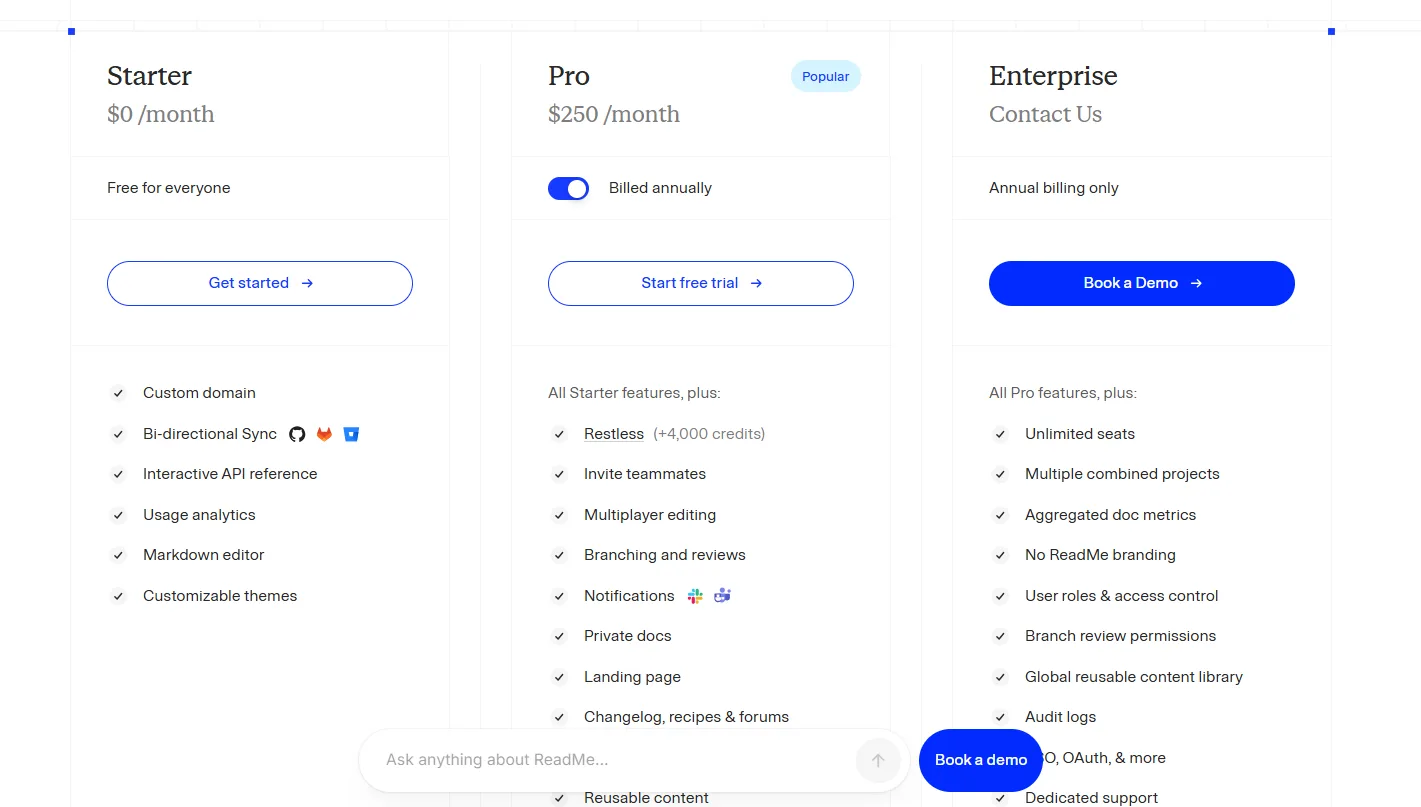
| Pricing Summary | ReadMe Starter is free, Pro costs $250 per month billed annually per project with 5 admins included and extra admins at $20 per month, and Ask AI and extended history are optional monthly add-ons. |
ReadMe Pros & Cons
✅ Pros
- The most complete developer hub on this list
- Free Starter plan for a first project
- Per-developer analytics nobody else here matches
- Personalised examples with the reader's own API keys
- Long track record with thousands of API companies
❌ Cons
- AI help is split between plan features and paid add-ons
- Per-project pricing adds up across many APIs
- Admin seats are capped, with extra admins billed monthly
- It documents APIs rather than designing them
Alternatives to ReadMe
Redocly - The review-gate rival, with linting and PR checks ahead of hub features.
Stoplight - Design and docs together when the spec itself needs governance.
Swagger - SwaggerHub for teams standardising design and docs on Swagger tooling.
Postman - When the docs must live next to collections, tests and mocks.
FAQs
Is ReadMe free?
▼How much does ReadMe Pro cost?
▼What is the difference between ReadMe and Redocly?
▼Does ReadMe write docs with AI?
▼Can readers try API calls inside ReadMe?
▼Does ReadMe show who uses my API?
▼More AI Tools You Might Like

SDK generation platform that turns an OpenAPI spec into typed, published client…
View Tool ↗
API hub where developers find, test, connect to and publish APIs with…
View Tool ↗
API design and documentation platform for OpenAPI, style guides, governance and team…
View Tool ↗
Google Cloud API management platform for securing, managing, monitoring and scaling APIs.
View Tool ↗
All-in-one API platform that puts design, debugging, testing, mocking and documentation in…
View Tool ↗
API documentation platform that builds branded developer portals from OpenAPI specs, with…
View Tool ↗
API client for testing REST, GraphQL, gRPC, SOAP, WebSocket, SSE and MCP…
View Tool ↗
Postman is the world's leading API platform for designing, testing, documenting, and…
View Tool ↗