

Buffer
✓ VerifiedBuffer is a social media management platform for scheduling posts, analyzing performance and managing content across channels.
Best For: Creators, small businesses and teams managing social media content
The Verdict: Buffer
Buffer is a strong choice for creators, small businesses and marketing teams that want a simple way to manage social media publishing without dealing with complicated workflows. Its biggest strengths are the easy scheduling system, channel-based pricing, AI Assistant and wide range of integrations.
The main limitation is that larger teams and agencies may find the per-channel pricing expensive as their social presence grows. Advanced reporting, approval systems and deeper analytics are also tied to paid plans. For individuals and small teams managing regular content, Buffer remains one of the easier tools to adopt and maintain.
What is Buffer?
Buffer is a social media management platform that helps creators and teams plan, schedule and analyze content across multiple social networks. It combines publishing tools, content ideas, AI assistance, analytics and collaboration features inside one dashboard.
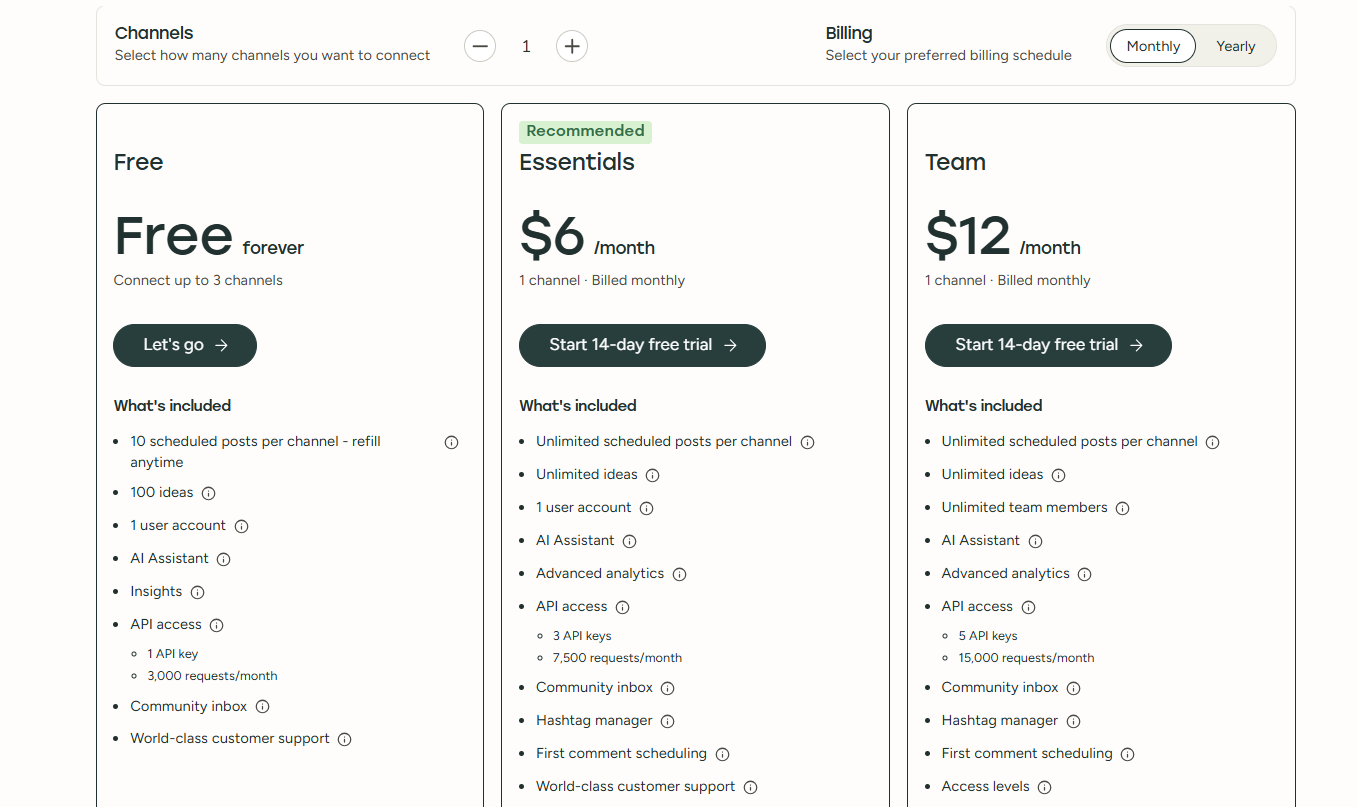
The platform works around connected channels. Users can create drafts, organize ideas, build a publishing queue and schedule posts across platforms such as Instagram, Facebook, LinkedIn, TikTok, YouTube and X. The Free plan supports up to three channels, while paid plans add unlimited scheduling, advanced analytics and more collaboration tools.
Buffer also fits into existing marketing workflows through integrations with tools such as Canva, ChatGPT, Claude, Zapier, Google Drive and WordPress. Developers can use the API to build custom workflows, while teams can manage approvals and access levels through higher plans.
Who is Buffer Best For?
Creators, small businesses and teams managing social media content
Buffer Key Features
Buffer Pricing & Plans
Buffer Review Summary
| Performance Score | A |
| Content Quality | Buffer combines social publishing, AI assistance, analytics, collaboration and integrations in one social media management platform. |
| Interface | The dashboard provides a clean workflow for creating drafts, scheduling posts, reviewing analytics and managing channels. |
| AI Technology | Buffer uses AI Assistant features for content refinement, repurposing and generating ideas based on social media workflows. |
| Purpose | Buffer helps creators and teams plan, publish and analyze social media content across multiple platforms. |
| Compatibility | Web, Mobile, Extension, API |
| Pricing Summary | Buffer offers a free plan, Essentials at $6 per month per channel and Team at $12 per month per channel with paid upgrades for additional features. |
Buffer Pros & Cons
✅ Pros
- Free plan available with up to 3 connected channels
- Simple interface for scheduling social posts
- Supports major platforms including Instagram, Facebook, LinkedIn, TikTok and YouTube
- AI Assistant helps improve and repurpose content
- Strong analytics for tracking post performance
- Team plans include collaboration and approval workflows
- Large integration ecosystem with Canva, Zapier, Google Drive and other tools
- Browser extension makes saving content easier
- API access is available for developers
- Flexible channel-based pricing helps small teams control costs
❌ Cons
- Advanced analytics require paid plans
- Free plan limits scheduled posts to 10 per channel
- AI features are helpful but not a full content creation replacement
- Per-channel pricing can become expensive for agencies managing many accounts
- Social listening features are limited compared with dedicated monitoring platforms
- Some advanced team controls require higher plans
FAQs
What is Buffer used for?
▼Is Buffer free to use?
▼What platforms does Buffer support?
▼Who is Buffer best for?
▼Does Buffer offer a free trial?
▼How much does Buffer cost?
▼Can Buffer schedule posts automatically?
▼Does Buffer have AI features?
▼Can Buffer manage comments?
▼Does Buffer provide analytics?
▼Does Buffer have an API?
▼Can Buffer connect with Canva?
▼Does Buffer support team collaboration?
▼Does Buffer have a mobile app?
▼More AI Tools You Might Like

ContentStudio is an AI social media management platform for content creation scheduling…
View Tool ↗
Publer is a social media management platform for scheduling posts creating content…
View Tool ↗
Ocoya is an AI social media management platform for creating scheduling and…
View Tool ↗
Sprinklr is an enterprise social media platform for publishing analytics and AI…
View Tool ↗
Sprout Social is a social media management platform for publishing, engagement, analytics,…
View Tool ↗
Hootsuite is a social media management platform for scheduling posts, analyzing performance…
View Tool ↗
VoxCPM2 is an open-source voice generation model for voice design, controllable voice…
View Tool ↗
Qwen3 TTS is a browser-based voice platform for text to speech, voice…
View Tool ↗