

Later
✓ VerifiedLater is a visual social media scheduler built for Instagram creators influencers and brands focused on aesthetic content.
Best For: Visual creators influencers and brands heavily focused on Instagram and TikTok
The Verdict: Later
Later remains an absolute powerhouse for creators who obsess over their visual branding. In my practical testing I found its biggest advantage is the combination of the visual grid planner and the native link in bio tool. You skip paying for a separate Linktree account entirely. The best time to post feature actually uses your real audience data instead of generic guesses.
The main limitation hits you if you publish high volumes of daily content. The $25 Starter plan caps you at just 30 posts per profile each month. Honestly most people hit that limit far too quickly if they post on TikTok and Instagram daily. You also get a shockingly low five AI credits on that base plan. But if you run a visual brand and prioritize aesthetics over massive volume it handles the job perfectly.
What is Later?
Later is a visual social media management platform built specifically to help creators plan and schedule aesthetic content. It focuses heavily on Instagram and TikTok workflows rather than massive enterprise reporting. You get a drag and drop calendar a built in link in bio tool and features that predict exactly when your audience is online.
The platform works by letting you upload media into a central library before assigning it to specific dates. You can visually arrange your Instagram grid to see exactly how posts will look next to each other before they go live. The system also pulls in user generated content and manages Reels audio directly from the dashboard.
This setup targets influencers fashion brands and visual content studios. It completely ignores heavy customer support ticketing. I have observed that creators stick with this tool simply because the grid planner works better than almost anything else on the market. It treats social media as a visual portfolio rather than just a text feed.
Who is Later Best For?
Visual creators influencers and brands heavily focused on Instagram and TikTok
Later Key Features
Later Pricing & Plans
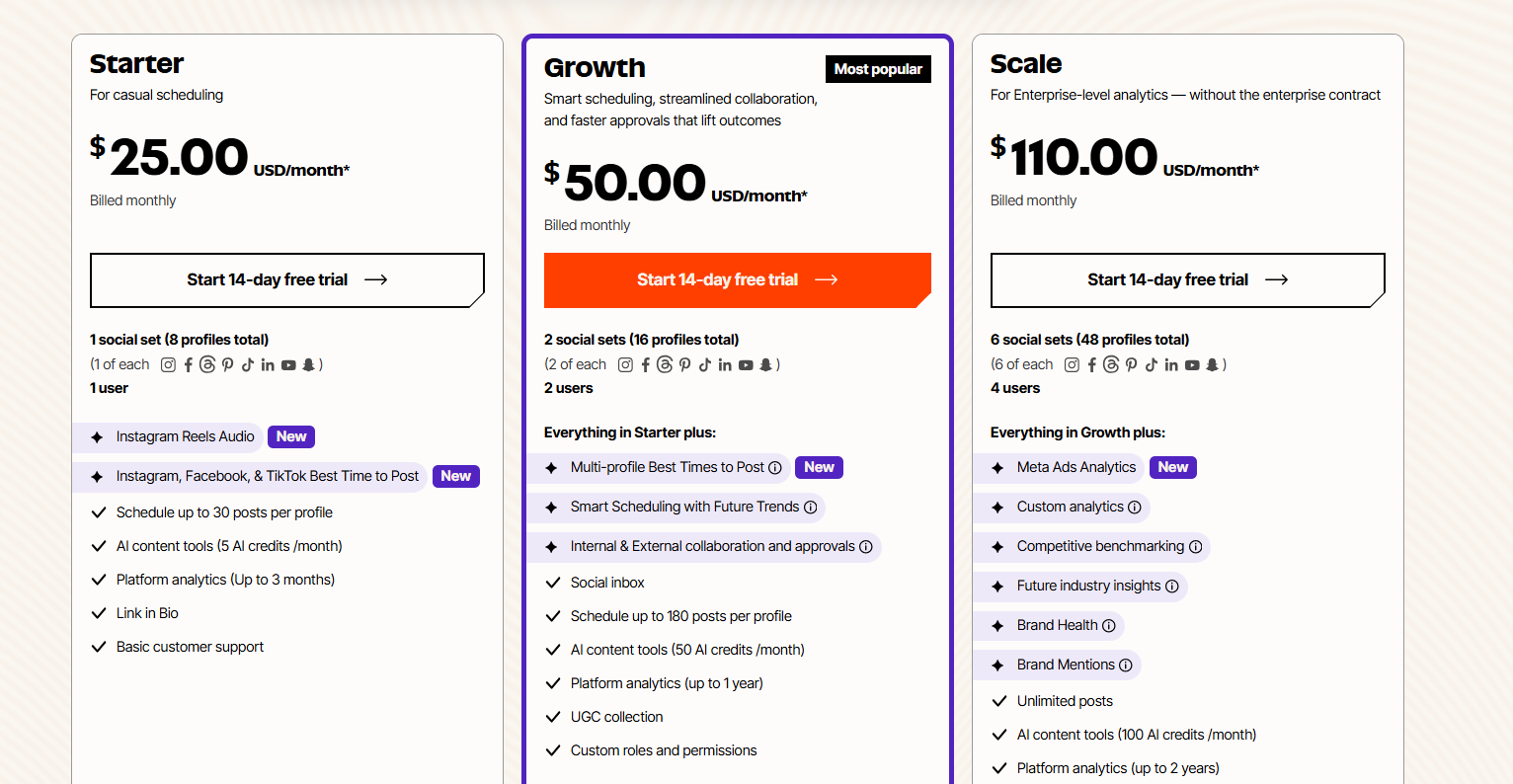
Later Review Summary
| Performance Score | A |
| Content Quality | Later provides exceptional visual planning and Instagram focused scheduling tools for active creators. |
| Interface | The drag and drop calendar provides a highly visual way to plan aesthetic social media feeds. |
| AI Technology | Later uses basic AI mostly for writing captions and suggesting optimal posting times based on historical data. |
| Purpose | Later helps creators plan visually consistent social media feeds and manage link in bio traffic from one dashboard. |
| Compatibility | Web, Mobile, Extension, API |
| Pricing Summary | Later requires a paid subscription starting at $25 monthly and scaling up to $110 for agency features. |
Later Pros & Cons
✅ Pros
- Provides the best visual drag and drop planner for Instagram feeds
- Includes a built in custom link in bio tool so you do not need Linktree
- Suggests the exact best times to post based on your specific audience
- Makes collecting and organizing user generated content incredibly simple
- Offers a very clean interface that visual creators understand instantly
- Handles Instagram Reels audio scheduling directly from the dashboard
❌ Cons
- Entry plan severely limits you to just thirty scheduled posts per profile
- AI content credits are extremely low on the basic starter tier
- Completely ignores deep enterprise customer care functions
- Pricing gets expensive quickly if you need to manage multiple client brands
FAQs
What is Later used for?
▼Is Later free to use?
▼What platforms does Later support?
▼Who is Later best for?
▼Does Later offer a free trial?
▼How much does Later cost?
▼Does Later include a link in bio tool?
▼More AI Tools You Might Like

Automated diagram software with intelligent formatting and data driven org charts across…
View Tool ↗
Figma's whiteboard with AI generation for diagrams, flowcharts and workshop boards from…
View Tool ↗
Diagram as code platform with an AI editor that writes and fixes…
View Tool ↗
Desktop and online diagram software with AI generation, 210+ diagram types and…
View Tool ↗
Budget friendly AI diagram tool with 100+ diagram types and a flat…
View Tool ↗
Professional diagramming software with AI generation, deep shape libraries and strong team…
View Tool ↗
Fast AI flowchart and mind map generator that turns text prompts into…
View Tool ↗
Team whiteboard with AI diagram generation, turning prompts into flowcharts and diagrams…
View Tool ↗