

Notion AI
✓ VerifiedNotion AI is a workspace platform with built-in AI that writes, summarizes, answers questions, and automates tasks directly inside your documents and databases.
Best For: Individuals, teams, and businesses who want AI assistance built directly into their project management and documentation workspace
The Verdict: Notion AI
Notion AI on the Business plan is the right choice for teams already committed to Notion as their primary workspace. If your team's documents, projects, databases, and meeting notes all live in Notion, the AI layer at $20 per user per month adds genuine value without requiring a separate tool subscription. The autonomous agents and cross-app search capabilities are the features that justify the Business tier for collaborative teams.
The limitation is clear: Notion AI is only as useful as your Notion investment. If your team uses Google Docs, Confluence, or Microsoft 365 as the primary workspace, Notion AI does not make sense as a standalone reason to switch. Writing quality also does not match dedicated tools like Claude or Jasper for polished long-form content. For individuals who just want AI writing help, the pricing structure no longer supports that use case affordably since the $10 add-on was retired.
What is Notion AI?
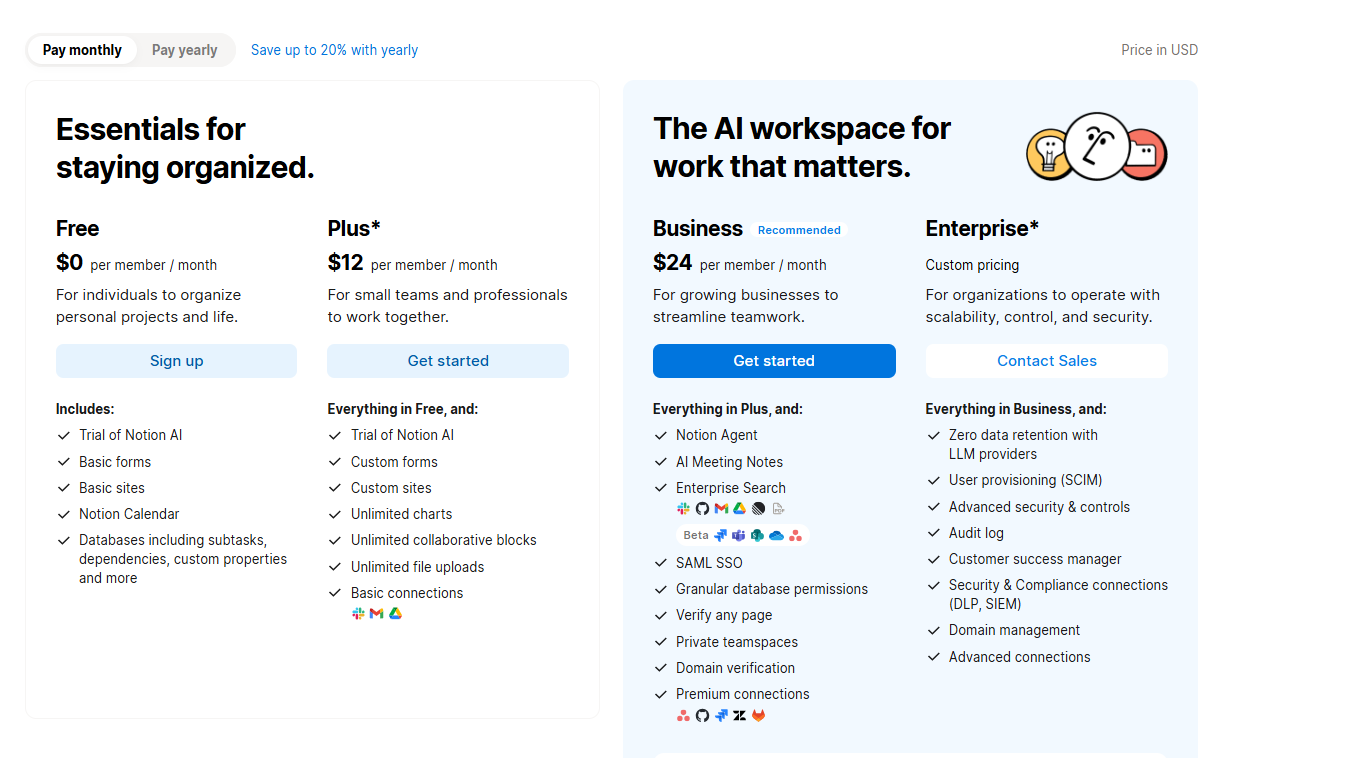
Notion AI is the AI layer built into Notion's workspace platform, handling writing, summarization, Q&A over your documents, meeting transcription, and autonomous agent tasks across connected apps. It is not a standalone tool. Notion AI only works inside a Notion workspace, and as of 2026, full AI features are bundled exclusively into the Business plan at $20 per user per month billed annually. The standalone $10 AI add-on was retired in May 2025 for new users, so Free and Plus plan users can no longer add full AI without upgrading.
The Business plan includes Notion Agent, which handles multi-step tasks like drafting documents, querying databases, and updating pages from a single prompt. AI Meeting Notes transcribes calls and auto-generates summaries with action items. Enterprise Search pulls context from connected apps including Slack, Google Drive, Salesforce, HubSpot, Jira, and GitHub. Custom Agents, launched February 24, 2026, run autonomously in the background triggered by database changes, schedules, or Slack messages, and are billed at $10 per 1,000 credits beyond the included allotment.
Notion describes its AI layer as model-agnostic, meaning you can switch workflows between different AI models without losing context. This flexibility matters for teams that want to use Claude for writing tasks and a different model for data analysis within the same workspace.
Who is Notion AI Best For?
Individuals, teams, and businesses who want AI assistance built directly into their project management and documentation workspace
Notion AI Key Features
Notion AI Pricing & Plans
Notion AI Review Summary
| Performance Score | A |
| Content Quality | AI writing and summarization quality is strong with the advantage of full workspace context making responses more relevant than standalone AI tools |
| Interface | Familiar Notion document interface with AI accessible via slash commands and sidebar tools without switching applications |
| AI Technology | Uses GPT-5 and Claude models on Business plan with Notion Agent for autonomous workflow automation and Enterprise Search for cross-tool knowledge retrieval |
| Purpose | Integrated AI workspace assistant for writing, research, meeting notes, task automation, and knowledge management in one platform |
| Compatibility | Web, Mobile, Desktop |
| Pricing Summary | Free with 20-response AI trial, Plus at $10 per user per month without full AI, Business at $20 per user per month with full AI suite, Enterprise custom pricing |
Notion AI Pros & Cons
✅ Pros
- AI is built into the same workspace where your content and projects already live
- Ask Notion answers questions across your entire knowledge base instantly
- Notion Agent handles complex multi-step workflows without manual intervention
- Business plan at $20 per month includes the full AI suite without add-ons
❌ Cons
- Full AI only available on Business plan at $20 per month — Free and Plus get 20 responses trial only
- Custom Agents now require additional credits at $10 per 1,000 on top of Business plan
- Per-seat pricing makes it expensive for large teams
- Free and Plus users cannot purchase full AI access after May 2025 change
FAQs
What is Notion AI used for?
▼Is Notion AI free to use?
▼What platforms does Notion AI support?
▼Who is Notion AI best for?
▼Does Notion AI offer a free trial?
▼More AI Tools You Might Like

Automated diagram software with intelligent formatting and data driven org charts across…
View Tool ↗
Figma's whiteboard with AI generation for diagrams, flowcharts and workshop boards from…
View Tool ↗
Diagram as code platform with an AI editor that writes and fixes…
View Tool ↗
Desktop and online diagram software with AI generation, 210+ diagram types and…
View Tool ↗
Budget friendly AI diagram tool with 100+ diagram types and a flat…
View Tool ↗
Professional diagramming software with AI generation, deep shape libraries and strong team…
View Tool ↗
Fast AI flowchart and mind map generator that turns text prompts into…
View Tool ↗
Team whiteboard with AI diagram generation, turning prompts into flowcharts and diagrams…
View Tool ↗