

AI Studios
✓ VerifiedAI video platform by DeepBrain AI with 2,000+ avatars, custom video avatars, dubbing and templates for presenter led videos.
Best For: Teams making avatar led training, marketing and explainer videos at volume
The Verdict: AI Studios
AI Studios is the pick for buyers who think in catalogues and volume. The avatar count, the template library and unlimited videos on paid plans make it a strong production line for teams that publish presenter led video every week, and the free plan is generous enough to test with a custom avatar of your own.
Read the pricing page slowly before you commit. The video plans and the Interactive Avatar plan are two products with two meters, generative credits sit beside the subscription, and the training extras many teams want live on Enterprise. If your needs are one presenter and a handful of videos, the platform may be more machine than you need. For steady output, it earns its shortlist place.
What is AI Studios?
AI Studios, built by DeepBrain AI, turns scripts, documents and slides into presenter led videos inside a browser studio. You choose an avatar, write or import your script, pick a voice, and the platform renders a finished video with the presenter speaking your lines. It is aimed at people who need that format again and again, for training, explainers, product walkthroughs and marketing clips.
The headline act is the library. The pricing page lists 2,000+ AI generated avatars on every plan, backed by a smaller set of studio made stock avatars. If none of them fit, you can build your own: a video avatar from a short recording of a real person, or a photo avatar from a single picture. Scenes can hold more than one avatar, gestures can be triggered from the script, and a library of 7,000+ templates gives repeat work a head start.
Around the avatars sits a full production kit. AI dubbing with lip sync carries videos into 150+ languages on paid plans, there are 1,000+ AI voices plus voice cloning, and auto captions, a script generator and a screen recorder round out the editor. A separate Interactive Avatar product adds live, real time conversational avatars through a link or the API, priced apart from the video plans.
Who is AI Studios Best For?
Teams making avatar led training, marketing and explainer videos at volume
AI Studios Key Features
AI Studios Pricing & Plans
AI Studios Review Summary
| Performance Score | B |
| Content Quality | Avatar led videos come out clean and consistent, with templates keeping repeat formats on brand. |
| Interface | A busy but logical browser studio that rewards a little learning time with a lot of control. |
| AI Technology | A large generated avatar library, custom video and photo avatars, dubbing with lip sync and generative models in one system. |
| Purpose | Built for teams producing presenter led video at volume, from training and explainers to marketing. |
| Compatibility | Web browsers, PPT and PDF import, SRT captions, API access, SCORM on Enterprise |
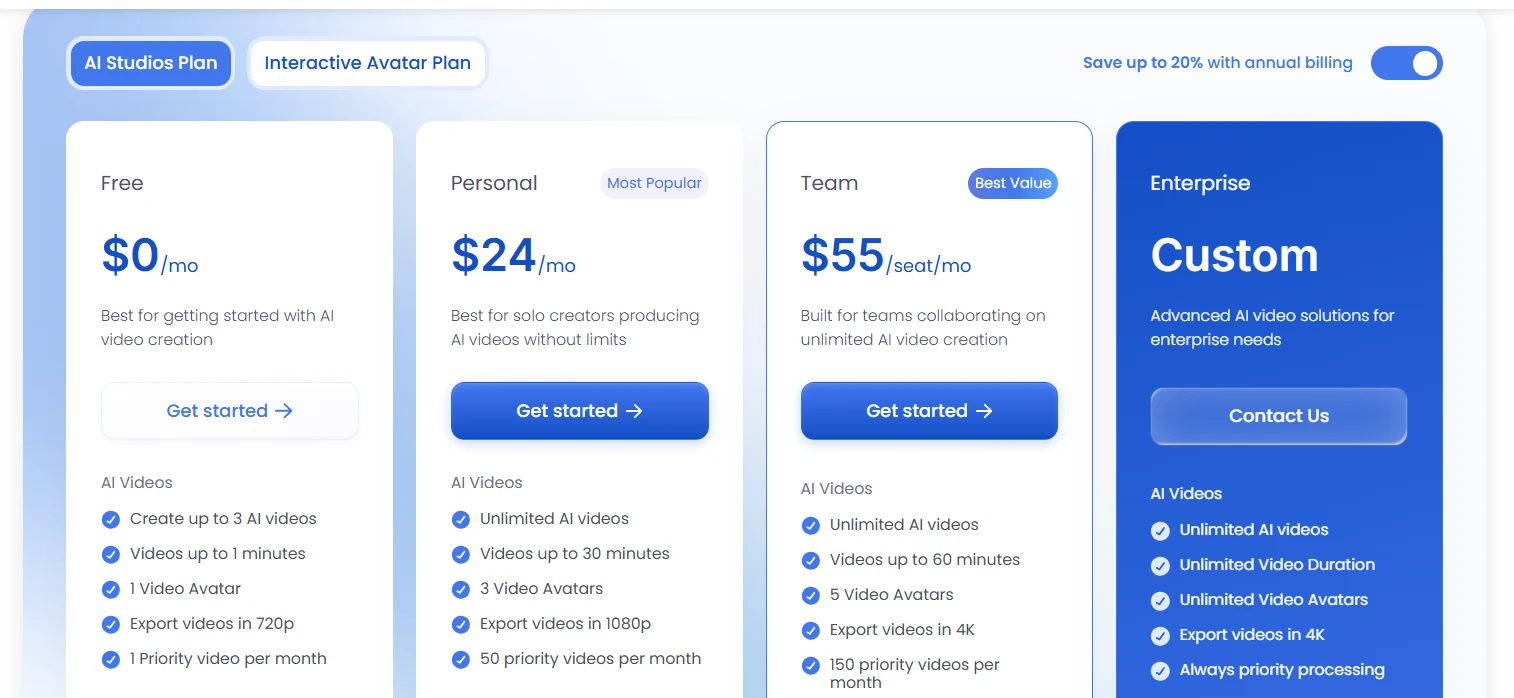
| Pricing Summary | AI Studios pricing starts at $24/month for the Personal plan after the free plan, with per seat Team pricing and custom Enterprise plans. |
AI Studios Pros & Cons
✅ Pros
- The avatar library is one of the largest in this market, so casting a presenter rarely stalls
- The free plan includes a custom video avatar slot, which most rivals keep behind a paywall
- Paid plans allow unlimited AI videos instead of a tight monthly video count
- Dubbing, translation and captions sit inside the same platform as the avatars
- Templates and document import make repeat training and explainer work much faster
❌ Cons
- The free plan caps videos at one minute and 720p, so it is a test drive only
- Two separate products, video plans and the Interactive Avatar plan, make the pricing page hard to read
- Generative work runs on its own credits, a second meter beside the subscription
- Useful extras like SCORM export and interactive quizzes sit on the Enterprise tier
- Team pricing is per seat, so costs climb in a straight line with headcount
FAQs
Is AI Studios free to use?
▼How much does AI Studios cost?
▼How many avatars does AI Studios have?
▼Can I create a custom avatar of myself in AI Studios?
▼AI Studios vs Synthesia, which is better?
▼What is the Interactive Avatar plan in AI Studios?
▼Does AI Studios dub videos into other languages?
▼More AI Tools You Might Like

AI video platform that turns documents and decks into interactive avatar training…
View Tool ↗
AI character video platform that turns a portrait and an audio track…
View Tool ↗
AI video platform that turns presentations, documents and web links into presenter-led…
View Tool ↗
AI avatar video platform with a daily free plan, 1,900+ avatars and…
View Tool ↗
Online video editor with AI avatars, AI twins, auto subtitles and dubbing,…
View Tool ↗
AI headshot generator that turns a few selfies into studio-quality professional photos…
View Tool ↗
KAYAK's conversational AI search lets you chat your way to flights, hotels,…
View Tool ↗
Tripadvisor's AI trip builder creates custom itineraries from your saves, powered by…
View Tool ↗