

VEED
✓ VerifiedOnline video editor with AI avatars, AI twins, auto subtitles and dubbing, so presenter videos are made and finished in one place.
Best For: Creators and marketing teams who want avatars inside a full video editor
The Verdict: VEED
VEED is the right pick when the avatar is only half the job and the editing, captions and branding around it matter just as much. No rival on the avatar list folds the presenter into a full editor this neatly, and the free plan makes it easy to check the workflow before money moves.
The honest limits are money shaped. Free exports carry a watermark, AI work burns credits that never roll over, and per seat pricing climbs as the team grows. If all you need is a talking presenter and nothing else, a dedicated avatar tool may serve you better. If your videos need finishing as well as filming, VEED earns its place.
What is VEED?
VEED is an online video editor that builds AI avatar videos and then lets you finish them in the same workspace. You pick a stock avatar or create an AI twin of yourself, type or paste a script, and the presenter delivers it on camera. After that you stay in VEED to cut the clip, add subtitles, drop in your logo, and export, instead of moving the file into a second editor.
The avatar side has two lanes. Stock avatars cover quick presenter work, with 60+ characters across professions and demographics speaking 120+ languages. The AI twin lane is personal: you record a short video of yourself reading a set script, and VEED builds a clone that can present future scripts for you. Around those sit the editor's regular AI tools, including text to video generation, dubbing and translation, and text to speech voiceovers, all drawing on the same pool of AI credits.
VEED fits marketers, creators and small teams who publish video every week and want one login for the whole job. It is less of a pure avatar studio and more of a video workshop where avatars are one strong bench among several. Teams should note the per seat model before they invite everyone, because every editor seat is billed.
Who is VEED Best For?
Creators and marketing teams who want avatars inside a full video editor
VEED Key Features
VEED Pricing & Plans
VEED Review Summary
| Performance Score | A |
| Content Quality | Avatar clips land well for social and marketing formats, and the editor polish around them is the real strength. |
| Interface | A clean browser editor that beginners can pick up fast, with avatars sitting inside the normal editing flow. |
| AI Technology | Stock avatars, a personal AI twin, text to video and dubbing share one credit based generation system. |
| Purpose | Built for creators and teams who want presenter style video without filming, finished in the same tool. |
| Compatibility | Web browsers, team workspaces, MP4 exports, social video formats |
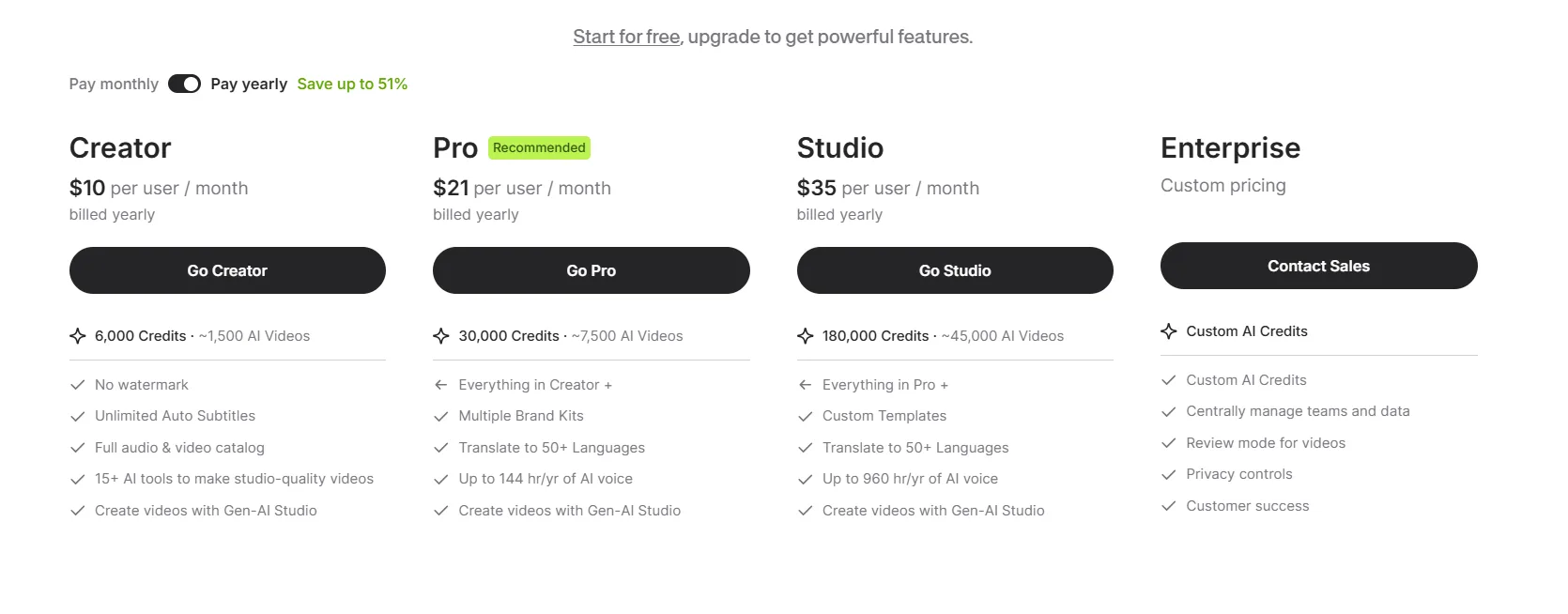
| Pricing Summary | VEED pricing starts at $25/month per user on monthly billing, with a lower per user rate on yearly billing and custom pricing for Enterprise. |
VEED Pros & Cons
✅ Pros
- Avatars and editing live in one tool, so there is no second app to finish a video
- A permanent free plan lets you learn the editor before paying anything
- Paid plans remove the watermark, which free exports always carry
- The AI twin setup is self serve, and VEED says the clone is ready within hours
- Yearly billing brings the per user cost down a lot against monthly billing
- Subtitle and dubbing tools are strong enough to carry a localization workflow
❌ Cons
- Free plan exports carry a watermark and suit testing, not publishing
- AI generations run on credits that refresh at renewal and never roll over
- Per seat pricing multiplies quickly once a whole team needs editor access
- Avatar and generation allowances on the entry plan run out fast for regular output
- There is no self serve free trial, and the only trial route is enterprise through sales
FAQs
Is VEED free to use?
▼Does VEED put a watermark on videos?
▼How much does VEED cost?
▼Can VEED create an AI avatar of me?
▼How many languages do VEED avatars speak?
▼Do VEED AI credits roll over?
▼Does VEED offer a free trial?
▼More AI Tools You Might Like

AI video platform that turns documents and decks into interactive avatar training…
View Tool ↗
AI character video platform that turns a portrait and an audio track…
View Tool ↗
AI video platform that turns presentations, documents and web links into presenter-led…
View Tool ↗
AI avatar video platform with a daily free plan, 1,900+ avatars and…
View Tool ↗
AI video platform by DeepBrain AI with 2,000+ avatars, custom video avatars,…
View Tool ↗
AI headshot generator that turns a few selfies into studio-quality professional photos…
View Tool ↗
KAYAK's conversational AI search lets you chat your way to flights, hotels,…
View Tool ↗
Tripadvisor's AI trip builder creates custom itineraries from your saves, powered by…
View Tool ↗