

Elai
✓ VerifiedAI video platform that turns presentations, documents and web links into presenter-led videos in 75+ languages, built for training teams.
Best For: Training teams turning slide decks and documents into presenter videos
The Verdict: Elai
Elai is the right buy for teams whose content already exists as slides, documents and articles and needs to become watchable video fast. The conversion tools, dialogs and quizzes give it a training depth that most avatar platforms keep behind enterprise contracts, and the free plan makes the workflow easy to judge before you spend anything.
The honest weakness is the meter. Plans run on monthly minutes, every render counts, and a team that publishes long videos every week will feel that cap and the cost of topping up. The avatar cast is also smaller than the category leaders, so realism chasers may look elsewhere. For deck driven training and multilingual rollouts, though, Elai earns its shortlist place.
What is Elai?
Elai is an AI video generator that turns text, slide decks, documents and web links into presenter led videos, aimed squarely at learning and development teams. You pick one of the 80+ stock avatars, add your script, and the avatar presents it on screen with matched lip movement. The starting points are what set Elai apart. A PowerPoint upload becomes a set of editable video slides, a blog link becomes a narrated video, and the AI storyboard can draft a course outline and script from a short prompt when you are starting from nothing.
The tool leans hard into training use. Avatar dialogs put two presenters on one slide for scenario based learning, quizzes and branching paths let viewers take part instead of just watching, and a built in screen recorder covers software walkthroughs. Localization is the other strong suit. Videos translate into more than 75 languages in a few clicks, and voice cloning lets one presenter speak in 28 languages, so a single course can ship to every regional team without new recordings.
Solo creators can use Elai happily, but the design clearly favors teams that publish training, onboarding and internal update videos on a schedule and want that work done in a browser, not a studio. The homepage names learning and development as the home ground, and the feature set backs that up at every step.
Who is Elai Best For?
Training teams turning slide decks and documents into presenter videos
Elai Key Features
Elai Pricing & Plans
Elai Review Summary
| Performance Score | B |
| Content Quality | Presenter output is clean and well suited to training and explainer content, with natural lip sync on the stock cast. |
| Interface | A tidy browser studio built around slides, so anyone who can edit a deck can build a video. |
| AI Technology | Text to speech in 75+ languages with 450+ accents, voice cloning in 28 languages and automated video translation. |
| Purpose | Turns existing training material like decks, documents and articles into presenter led video without a production team. |
| Compatibility | Web, PowerPoint, PDF |
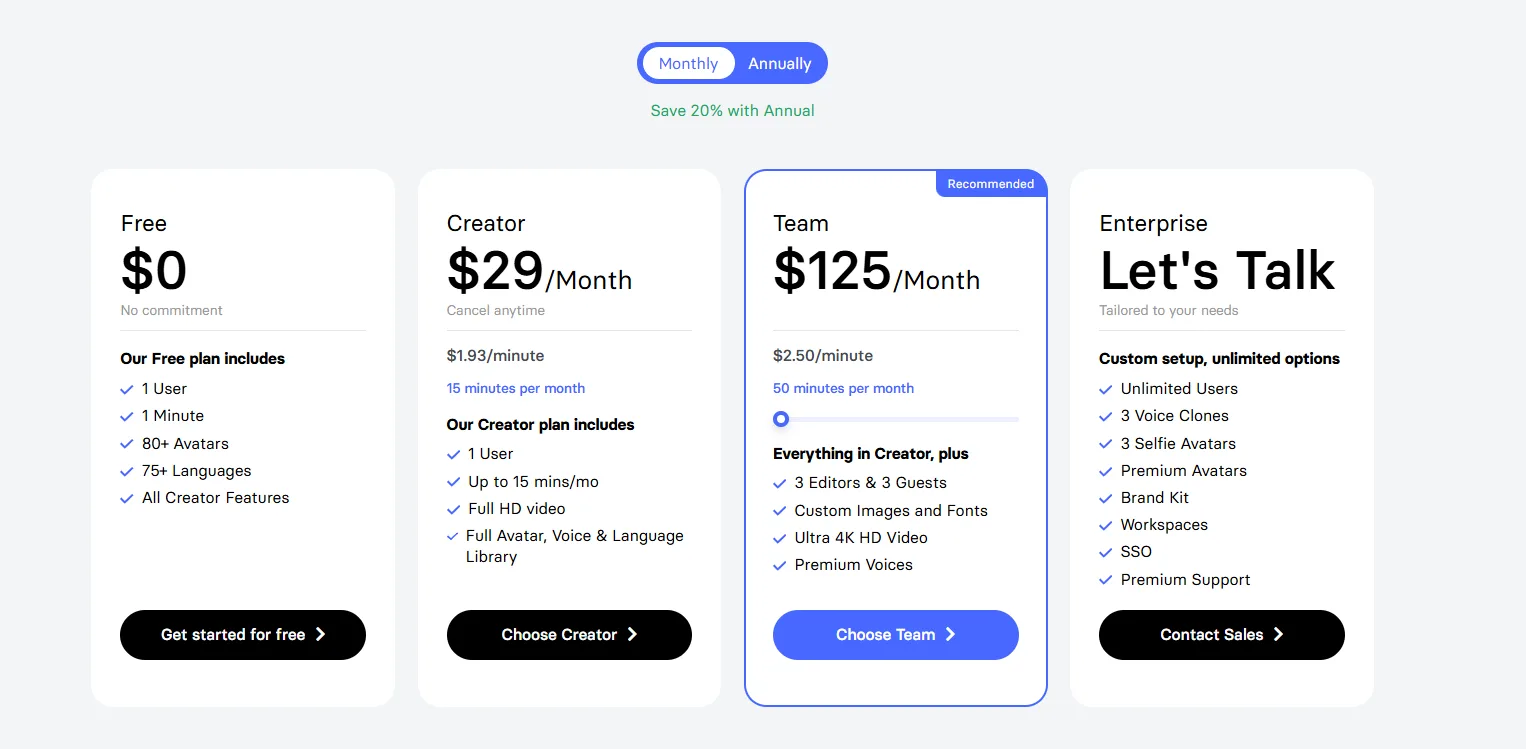
| Pricing Summary | Paid plans start at $29/month for the Creator plan with a monthly pool of video minutes, and a free plan with one minute is available for testing. |
Elai Pros & Cons
✅ Pros
- Slide decks and documents become videos with very little manual work
- Free plan lets you test the full workflow before paying anything
- Strong fit for learning and development teams and course creators
- Translation and voice cloning make multilingual training far cheaper to produce
- Avatar dialogs and quizzes add interactivity most rivals charge enterprise rates for
❌ Cons
- Pricing runs on monthly minutes, so heavy publishers can burn through an allowance fast
- Every render uses minutes, even when you re-render the same video after a small edit
- Free plan is a single minute, which is a test drive and nothing more
- Avatar library is smaller than the biggest rivals in this category
FAQs
Is Elai free to use?
▼How much does Elai cost?
▼How do I turn a PowerPoint into a video with Elai?
▼Elai vs Synthesia, which one is better?
▼Can Elai translate my video into other languages?
▼What happens when I run out of minutes on Elai?
▼Can I create my own avatar in Elai?
▼More AI Tools You Might Like

AI video platform that turns documents and decks into interactive avatar training…
View Tool ↗
AI character video platform that turns a portrait and an audio track…
View Tool ↗
AI avatar video platform with a daily free plan, 1,900+ avatars and…
View Tool ↗
Online video editor with AI avatars, AI twins, auto subtitles and dubbing,…
View Tool ↗
AI video platform by DeepBrain AI with 2,000+ avatars, custom video avatars,…
View Tool ↗
AI headshot generator that turns a few selfies into studio-quality professional photos…
View Tool ↗
KAYAK's conversational AI search lets you chat your way to flights, hotels,…
View Tool ↗
Tripadvisor's AI trip builder creates custom itineraries from your saves, powered by…
View Tool ↗