

Vidnoz AI
✓ VerifiedAI avatar video platform with a daily free plan, 1,900+ avatars and 2,000+ voices for explainers, training and marketing videos.
Best For: Beginners and small teams who want a generous free plan for avatar videos
The Verdict: Vidnoz AI
Vidnoz is the easiest recommendation in this category for anyone who wants to start free and stay cheap. The daily credit refill is genuinely unusual, the libraries are big, and the paid entry tier removes the watermark without asking premium money. For testing ideas and producing steady, simple avatar content, it does the job well.
The trade offs are polish and predictability. Free output is watermarked at 720p, credit use varies by avatar type so a month of publishing takes some planning, and the top end avatar realism still belongs to pricier rivals. Judge it as a budget workhorse rather than a flagship studio tool and it will not disappoint.
What is Vidnoz AI?
Vidnoz AI is a browser based video platform that builds presenter led videos from a script, an avatar and a voice, with no camera or studio involved. You pick from more than 1,900 stock avatars, type what the avatar should say, choose from over 2,000 voices in 140+ languages, and Vidnoz renders a lip synced video you can download, embed or share. Templates do the layout work for you, with 2,800+ ready made designs for explainers, training, sales and onboarding.
What makes Vidnoz stand out in a crowded market is the free plan. Instead of a one time trial, it hands out credits every single day, so you can test avatars, voices and scripts for weeks and only pay when a video actually matters. Around that core sits a wide toolset. The talking photo feature animates a still portrait, Avatar Lite builds a digital twin from a short recording, and the video translator converts finished videos into other languages with lip sync kept in place.
The platform is clearly priced and built for volume on a budget. Small teams, educators and solo creators get training, marketing and customer facing video from one login, while larger organizations can step up to team workspaces, SCORM export and branded video pages on the higher tiers.
Who is Vidnoz AI Best For?
Beginners and small teams who want a generous free plan for avatar videos
Vidnoz AI Key Features
Vidnoz AI Pricing & Plans
Vidnoz AI Review Summary
| Performance Score | B |
| Content Quality | Output is clean and watchable for explainers and training, with expressive avatar options on paid plans. |
| Interface | A simple four step browser workflow with templates up front, friendly for first time video makers. |
| AI Technology | A large avatar and voice library with lip sync, voice cloning and lip synced translation in 140+ languages. |
| Purpose | Low cost avatar video creation for training, marketing, sales and social content. |
| Compatibility | Web, PowerPoint, PDF, SCORM |
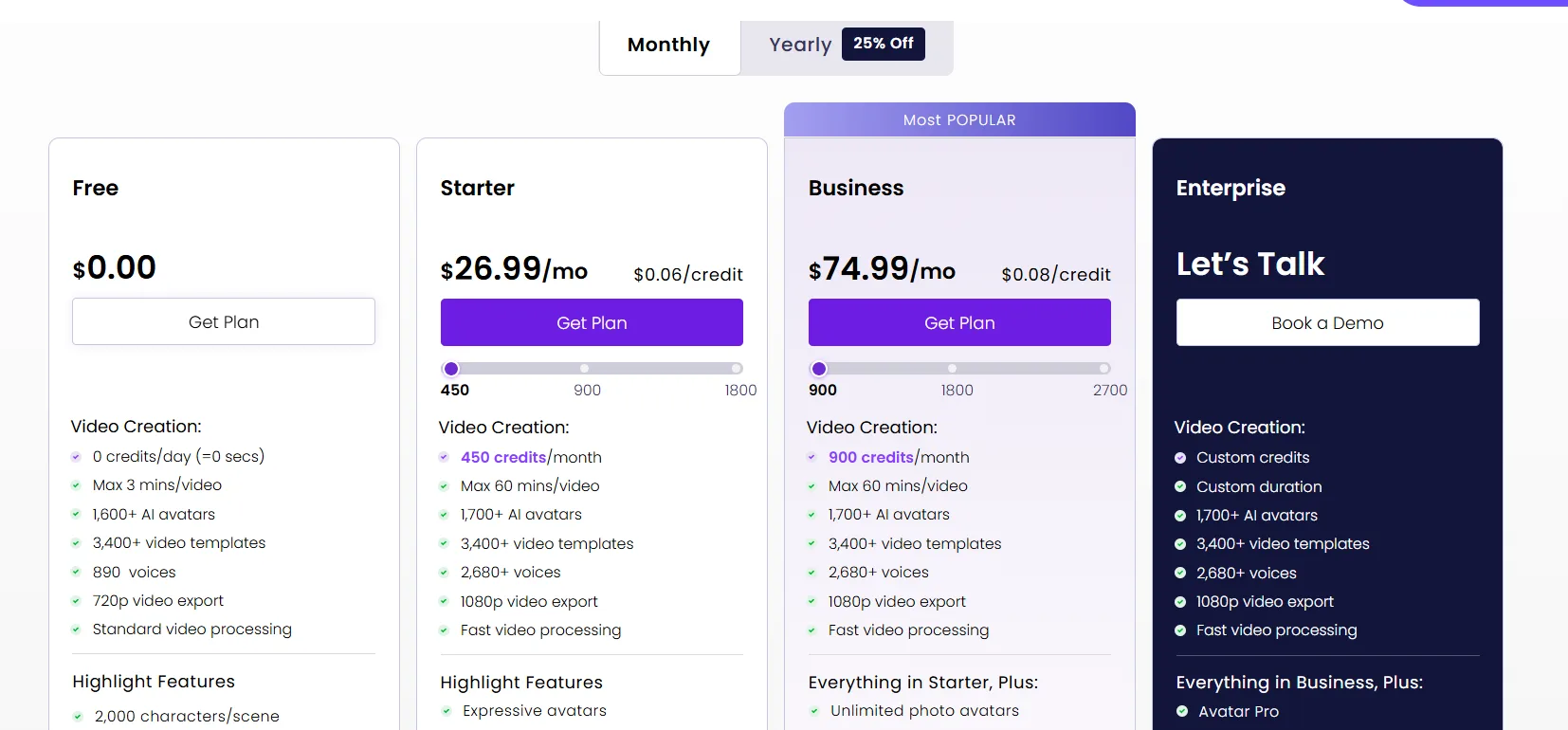
| Pricing Summary | Paid plans start at $26.99/month for the Starter plan with a monthly credit pool, and a free plan with daily credits is available. |
Vidnoz AI Pros & Cons
✅ Pros
- Free plan refreshes daily, so you can keep testing without paying
- Huge avatar, voice and template libraries at an entry level price point
- Paid plans remove the watermark and raise exports to 1080p
- Covers training, marketing, sales and explainer videos in one account
- Simple four step workflow that suits complete beginners
❌ Cons
- Free exports carry a watermark and stop at 720p, so they are not publish ready
- Credit rates vary by avatar type, which makes monthly output harder to predict
- Free videos are capped at short lengths, so long content needs a paid plan
- Avatar realism sits a step behind the premium leaders in this category
FAQs
Is Vidnoz AI really free?
▼How do Vidnoz credits work?
▼Does Vidnoz put a watermark on videos?
▼How much does Vidnoz cost?
▼Can I use Vidnoz videos for commercial work?
▼How many avatars and languages does Vidnoz have?
▼How do I make my first video with Vidnoz?
▼More AI Tools You Might Like

AI video platform that turns documents and decks into interactive avatar training…
View Tool ↗
AI character video platform that turns a portrait and an audio track…
View Tool ↗
AI video platform that turns presentations, documents and web links into presenter-led…
View Tool ↗
Online video editor with AI avatars, AI twins, auto subtitles and dubbing,…
View Tool ↗
AI video platform by DeepBrain AI with 2,000+ avatars, custom video avatars,…
View Tool ↗
AI headshot generator that turns a few selfies into studio-quality professional photos…
View Tool ↗
KAYAK's conversational AI search lets you chat your way to flights, hotels,…
View Tool ↗
Tripadvisor's AI trip builder creates custom itineraries from your saves, powered by…
View Tool ↗