
getimg
✓ Verifiedgetimg.ai brings multiple AI image models, editing tools, video generation and upscaling into one creative workspace.
Best For: Creators, designers and teams needing multiple AI models in one workspace
The Verdict: getimg
getimg.ai is a strong choice if you want access to several current AI models without paying for each service separately. The biggest advantage is breadth, you can generate an image, edit it, upscale it and turn it into video without leaving the same workspace. Paid plans also include commercial rights, which makes the service more practical for client work and business content.
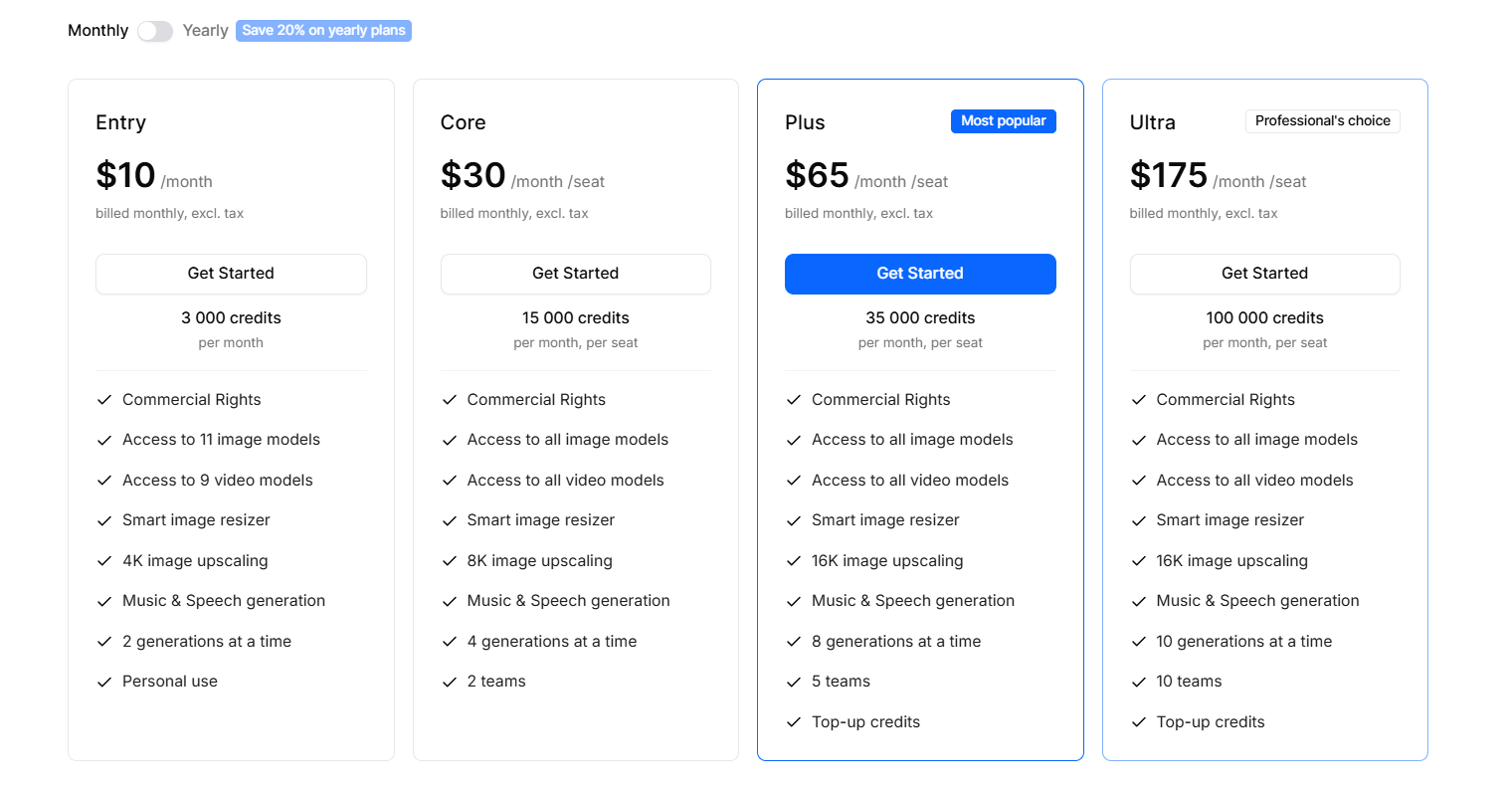
The trade-off is the pricing structure. There is no free plan, and credits are consumed differently depending on the model, resolution and settings you choose. That means heavy users need to watch their credit usage rather than judging the service only by its monthly subscription price. For creators and teams working across several AI models, though, that extra flexibility can be worth it.
What is getimg?
getimg.ai is an AI creative platform that lets you generate and edit images, create videos and upscale visual content from one workspace. Instead of locking you into one model, it brings different image and video models together and lets you choose a model or let its Auto mode select one for the task.
The image side covers text-to-image, image editing, inpainting, outpainting, background removal, resizing and upscaling. I particularly like the Elements approach for projects where the same person, product or visual style needs to appear across several generations. You save the reference once, then call it back in later prompts.
But getimg.ai has moved beyond images. You can now create video, music, speech and sound effects in the same account. Developers get a separate API with a common interface across multiple image and video models, which makes the platform more interesting for teams building their own creative workflows.
Who is getimg Best For?
Creators, designers and teams needing multiple AI models in one workspace
getimg Key Features
getimg Pricing & Plans
getimg Review Summary
| Performance Score | A |
| Content Quality | getimg.ai combines a broad selection of current AI models with generation, editing, video and audio tools in one workspace. |
| Interface | The workspace groups image, video and audio actions in a clear sidebar, while a shared gallery keeps generated content easy to manage. |
| AI Technology | getimg.ai connects multiple third-party AI models and can automatically select a model based on the task. |
| Purpose | The platform is built to help creators and teams produce and edit visual and audio content without moving between several AI services. |
| Compatibility | Web, API |
| Pricing Summary | Paid plans start at $10/month, or $8/month with annual billing, with higher tiers adding more credits, models, generations and upscaling capacity. |
getimg Pros & Cons
✅ Pros
- Multiple leading AI models are available from one account
- Model switching saves you from maintaining separate subscriptions
- Image editing and generation work inside the same workspace
- Reference images and Elements help maintain visual consistency
- Paid plans include commercial rights for created images and videos
- API access gives developers a way to add image and video generation to products
- Image and video tools are joined by music, speech and sound effects
❌ Cons
- There is no free plan for trying the main platform
- The credit system can take some getting used to because different models consume different amounts
- Access to all models requires a higher-priced plan
- Using several high-cost models can consume credits quickly
- The platform can feel broad if you only need a simple image generator
- Some AI editing results still depend heavily on the source image and prompt
FAQs
What is getimg.ai used for?
▼Is getimg.ai free to use?
▼What platforms does getimg.ai support?
▼Who is getimg.ai best for?
▼Does getimg.ai offer a free trial?
▼How much does getimg.ai cost?
▼Does getimg.ai allow commercial use?
▼What AI models does getimg.ai support?
▼Can getimg.ai generate videos?
▼Can getimg.ai upscale images?
▼Does getimg.ai have an API?
▼Can getimg.ai keep characters consistent?
▼More AI Tools You Might Like

AI video platform that turns documents and decks into interactive avatar training…
View Tool ↗
AI character video platform that turns a portrait and an audio track…
View Tool ↗
AI video platform that turns presentations, documents and web links into presenter-led…
View Tool ↗
AI avatar video platform with a daily free plan, 1,900+ avatars and…
View Tool ↗
Online video editor with AI avatars, AI twins, auto subtitles and dubbing,…
View Tool ↗
AI video platform by DeepBrain AI with 2,000+ avatars, custom video avatars,…
View Tool ↗
AI headshot generator that turns a few selfies into studio-quality professional photos…
View Tool ↗
KAYAK's conversational AI search lets you chat your way to flights, hotels,…
View Tool ↗