What Is Agentic AI? Definition, How It Works & Real Examples
Agentic AI is AI that does the work instead of just talking about it. You hand it a goal – say, “sort out this refund” – and it plans the steps, opens the right tools, checks its own results, and keeps going until the job is done.
No step-by-step prompting. That is the entire idea.
Your chatbot wrote the perfect email. Great. But who sends it? Who follows up when the customer replies? Who updates the CRM so sales stops calling about a closed ticket?
Nobody. That gap is exactly why agentic AI exists.
Look, most AI you have used is a brilliant talker with no hands. Agentic AI is the version with hands. And once you feel the difference, you stop asking AI for answers and start handing it jobs.
So What Actually Makes AI “Agentic”?
Strip away the marketing and you get four traits. Miss even one, and you are probably looking at a chatbot in a costume.
First, it works toward a goal, not a prompt. You describe the outcome. It figures out the path.
Second, it acts on its own between check-ins. It does not pause after every step waiting for you to say “continue.”
Third, it uses tools. Real ones. Your CRM, your inbox, your database, your calendar. An agent that cannot touch your systems is just a parrot with confidence.
Fourth, it adjusts. When step three fails, it does not shrug and quit. It rethinks and tries a different route.
The test I use: if the system cannot choose its own next step, it is not agentic.
From what I have seen, most “AI agents” being sold right now fail that test. They are scripted workflows with a language model sprinkled on top. Ask the vendor one question: “After the model produces an answer, who picks the next step?” If a human or a fixed script picks it, you are buying automation with good marketing.
And honestly? Nothing wrong with automation. Just do not pay agent prices for it.
How Does Agentic AI Actually Work?
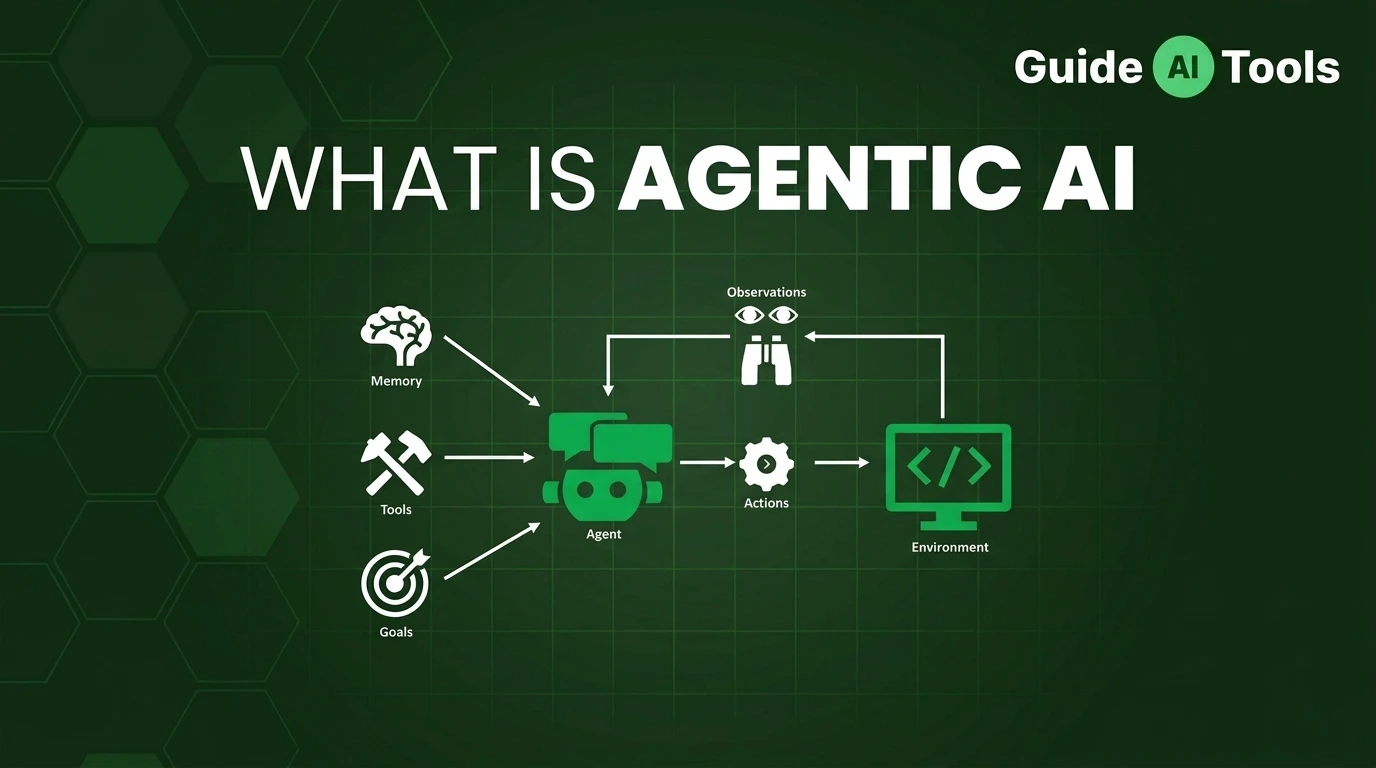
Under the hood it runs a loop. Five steps, repeating until the goal is met or the agent hits a wall it cannot climb.
- Perceive. The agent reads the situation: your request, the current state of your systems, whatever data matters. It builds a picture of where things stand right now.
- Reason. It thinks through the problem against the goal. What needs to happen? What could go wrong? This is where the language model earns its keep – not writing pretty sentences, but making judgments.
- Plan. It breaks the goal into steps and picks an order. Not a rigid script. A plan it is allowed to rewrite mid-flight.
- Act. It does something in the world. Calls an API. Updates a record. Sends the email. This step separates agents from chatbots. It is also where things get dangerous, which we will get to.
- Reflect. It looks at what happened. Did that action move things closer to the goal? If yes, continue. If no, replan. If stuck, escalate to a human.
Then the loop repeats.
Watch it on a real task. Goal: “Handle this refund request.” The agent reads the ticket (perceive), checks the order history and the refund policy (reason), maps the steps – verify purchase, check policy, issue refund, notify customer (plan), pulls the order from the CRM and issues the refund through the payment API (act), then confirms the refund posted and the ticket closed (reflect). One instruction from you. Six or seven actions from it.
In my testing, the reflect step is where cheap agents fall apart. They act, something fails silently, and they march on like everything worked. A serious agent verifies its own work. Ask how an agent confirms results before you trust it with anything real.
The 5 Parts Inside Every Agentic System
You do not need an engineering degree here. But knowing the parts helps you smell nonsense on sales calls.
- The reasoning engine is usually a large language model. The brain. Confident even when wrong, which is exactly why the other parts exist.
- Memory comes in two flavors. Short-term tracks the live task: current step, last tool result. Long-term stores what the agent learned across sessions: your preferences, past failures, customer history. No memory means every task starts from zero.
- The planner turns “handle the refund” into an ordered list of moves, with backup options ready. Weak planners write step one and improvise the rest.
- Tools and integrations: APIs, databases, browsers, email, calendars. The hands. Here is what vendors gloss over: every tool you connect is a new way for the agent to break something. Connect with intent, not enthusiasm.
- Reflection and guardrails. The inner critic plus the rulebook. What may it do alone? What needs your approval? Where does it stop and ask? Guardrails are not optional extras. They are the difference between an agent and a liability.
Agentic AI vs Generative AI vs Traditional AI
People mix these up constantly. The confusion costs real money, because teams buy one thing expecting another.
| Traditional AI | Generative AI | Agentic AI | |
|---|---|---|---|
| Main job | Predict or classify | Create content | Finish multi-step jobs |
| You give it | Data or a narrow input | A prompt | A goal plus boundaries |
| What it does | One fixed function | Produces output, then waits | Plans, acts, checks, repeats |
| Uses your tools? | No | Rarely | Yes – that is the point |
| Your role | Set it and forget it | Direct every step | Set guardrails, handle exceptions |
| Final output | A prediction or label | Text, image, code, summary | A completed task or a flagged exception |
| Biggest risk | Bad predictions | Wrong or misleading content | Wrong actions that are hard to undo |
Read that last row twice.
A chatbot that hallucinates gives you bad text. An agent that hallucinates might refund the wrong customer. Risk moves from words to actions, and everything about how you evaluate these systems changes with it.
Generative AI is the engine. Agentic AI is the car built around it. You need the engine, but the engine alone does not get you to work. (If you need a refresher on the engine itself, here is our explainer on what generative AI is.)
Agentic AI vs AI Agents: Is There Actually a Difference?
Yes. Simple one.
Agentic AI is the approach. The capability set: autonomy, planning, tool use, reflection.
An AI agent is the software built with that approach. The actual thing running in your stack.
Think electricity versus the lamp. You would not say “we installed electricity in the conference room” when you mean the lighting. Same deal here. If you want the full breakdown of the software side, read our guide on what AI agents are and how they compare with chatbots.
6 Examples That Show What Agents Actually Do
Enough theory. Here is the practice.
Customer support that finishes the job. A ticket arrives about a damaged order. The agent reads it, pulls the order history, checks the warranty policy, approves the replacement, books the return label, and emails the customer. A human only appears if the policy is ambiguous. This runs in production at plenty of support desks today.
The coding teammate. You describe the bug. The agent reads the repo, reproduces the error, writes a fix, runs the tests, and opens a pull request with a summary. You review the diff the way you would from a junior dev.
Travel booking without the tab hell. “Three days in Lisbon under $900, near the metro.” The agent searches flights and hotels, compares options against your constraints, holds a booking, and sends one summary for approval. Not forty links. A decision.
The Monday report that writes itself. Your agent pulls last week’s sales data, spots the three biggest changes, drafts the summary with charts, and drops it in Slack. Your time spent: zero minutes.
Sales prospecting on autopilot. The agent watches for trigger events – funding news, hiring posts – researches the account, drafts personalized outreach, and queues it for your approval. It does the research you never had time for.
IT helpdesk triage. Password reset? The agent verifies identity and handles it. New laptop request? It checks policy, provisions access, files the ticket. Only the weird stuff reaches a human.
See the pattern? Every example is a workflow, not a question. If the task ends with an answer, you want generative AI. If it ends with something done, you want an agent.
Why Teams Are Actually Adopting This
Four reasons. No fluff.
It eats the boring middle of work. Not the creative parts, not the judgment calls. The middle: copying data between systems, chasing approvals, updating records. That middle is where workdays go to die.
It works while you sleep. An agent clearing support tickets at 3am is not a metaphor anymore.
It improves on stable tasks. Unlike fixed automation, an agent that reflects on results refines its approach over time in well-defined environments. Slowly. Only where things stay predictable. No miracles. But measurable.
It scales what nobody wants to scale. Fifty new hires means fifty account setups, fifty welcome emails, fifty training schedules. An agent does all fifty identically, without getting bored or sloppy.
But – and this is a big but – every benefit above assumes the agent is set up right. Most are not. Which brings us to the part vendors skip.
The Risks Nobody Puts on the Landing Page
I have watched teams get burned here. Usually in the same five ways.
| Risk | What actually goes wrong | The guardrail that prevents it |
|---|---|---|
| Hallucinated actions | The agent misreads data and refunds the wrong order or emails the wrong client | Human approval before any external or irreversible action |
| Tool misuse | Right tool, wrong parameters – it updates 500 records instead of 5 | Least-privilege access: only the tools and scope the agent needs |
| Permission creep | Over months the agent quietly accumulates broader access than anyone intended | Quarterly access reviews plus logged tool calls |
| Runaway loops and cost | The agent retries a failing step 200 times overnight, burning API budget | Hard step budgets, spend alerts, auto-pause on repeated failure |
| Data exposure | The agent pulls sensitive customer data into logs or messages it should not | Data masking rules and clear policies on what it may read and share |
Look at that table once more. Every risk is a configuration problem, not a mystery of the technology. Good news: all of it is preventable. Bad news: most teams deploy first and configure later.
Honestly, most teams mess this up by handing the agent the keys to everything on day one. Do not. Start read-only. Let it prove it reads correctly before it writes anything. Expand scope one tool at a time.
From what I have seen, the teams that win treat their first agent like a new hire on probation. Limited access. Close supervision. Trust expands only as it is earned. The teams that lose hand it admin credentials and go to lunch.
IBM’s field notes on agentic AI in production land in the same place: automate the whole workflow, keep humans on the exceptions. Their write-up on agentic AI in practice is worth your time if you are planning a rollout.
When to Use Agentic AI (and When to Walk Away)
This is the section I wish someone had written for me two years ago.
Reach for an agent when the work is multi-step and you can describe what “done” looks like. Recurring workflows are the sweet spot: support triage, report generation, data syncing, prospecting. Spans more than one tool? Happens more than once a week? An agent probably earns its keep.
Also strong: tasks where the path varies but the rules stay fixed. “Follow the refund policy” is a perfect agent job. Situations differ every time. The policy does not.
Walk away when the goal cannot be defined. If you cannot explain what success looks like, the agent cannot either, and it will confidently optimize for the wrong thing.
Walk away when actions are irreversible and high-stakes. Moving money, deleting data, sending contracts: agents can help here, but never without a human approving the exact action first.
And walk away when a simple answer is all you need. Do not deploy a multi-step reasoning loop to condense a document. That is hiring a project manager to sharpen pencils.
The truth is, half the “failed agent” stories I hear are wrong-tool stories. The agent worked fine. It was just the wrong job.
What Comes Next
Two things are really happening under the noise.
First, agents are teaming up. One researches, another writes, a third checks the work. Multi-agent setups handle bigger workflows, but they multiply every risk in the table above. Supervision gets harder, not easier.
Second, the industry is finally admitting it needs rules. Audit trails, permission standards, liability when an agent acts for a company: the governance conversation is late, but it started.
My contrarian take? The winners will not run the smartest models. They will run the most boring infrastructure: clean permissions, good logs, clear escalation paths. Unsexy. Decisive.
FAQs
What is agentic AI in simple terms?
AI that completes jobs instead of just answering questions. You set a goal, and it plans the steps, uses your software tools, checks its results, and keeps going until the work is done or it needs your help.
How does agentic AI work?
It runs a loop: perceive the situation, reason about it, plan steps, act through tools like APIs and databases, then reflect on the result. Off track? It replans. The loop repeats until the goal is met.
What is the difference between agentic AI and generative AI?
Generative AI creates content from a prompt and stops. Agentic AI pursues a goal across multiple steps, using tools and adjusting its plan. One produces outputs. The other produces outcomes.
What is the difference between agentic AI and AI agents?
Agentic AI is the approach: autonomy, planning, tool use. An AI agent is the software built that way. Capability versus product.
Can agentic AI work without human supervision?
Within boundaries, yes. It handles routine steps alone and escalates what it is not authorized to decide. Check-in frequency depends entirely on the permissions and approval rules you set. Fully unsupervised operation on important systems is reckless, not advanced.
What tools does agentic AI use?
Whatever you connect: CRMs, databases, email, calendars, code repos, browsers, payment systems. If you are building rather than buying, the established open-source frameworks are LangGraph for complex stateful workflows, CrewAI for role-based agent teams, and Microsoft’s Agent Framework (which absorbed the older AutoGen project) for .NET and Azure shops. The permission list matters more than the tool list.
How much does agentic AI cost to run?
More than chatbots, and the math is simple. Every step in an agent’s loop is a model call, so a 20-step task costs roughly 20 times a single chat reply. Using current OpenAI pricing as a reference: on the mid-tier GPT-6.1 Sol ($2 per million input tokens, $10 per million output), a 20-step run lands near $0.18. A thousand such runs a day puts you around $5,400 a month, while the flagship GPT-6 Astra ($10/$50) pushes the same workload past $27,000. Pick the cheapest model that handles the task, and set step budgets plus spend alerts before your first production run.
Is agentic AI safe?
As safe as its guardrails. With least-privilege access, approval gates on consequential actions, and audit trails, agents run reliably. Skip those and you handed car keys to a brand-new driver.
Do I need to code to use agentic AI?
Not necessarily. No-code platforms now ship agents for support, sales, and productivity workflows. Coding helps for custom integrations, but most business use cases no longer require it.
Your First Move
Start small. Pick one recurring workflow, give an agent read-only access, and watch it for two weeks. You will learn more from that experiment than from a month of vendor demos.
When you are ready to compare real options, browse the GuideAITools AI tools directory. We track the agent platforms and productivity tools actually worth your time, so you pick with evidence instead of hype. And if you are still fuzzy on the basics, our pillar guide on what artificial intelligence is is the right starting point.

Related Blog Posts